
"Export to Python" appears on the feature list of plenty of visual data tools. What you get when you press the button varies a lot, and the difference decides whether the export is useful to you or just reassuring.
This post covers what I look for in an export, using the code Ciaren generates as the worked example. Ciaren is the open-source visual ETL tool I work on; every Ciaren script below was produced by its code generator.
Read the imports first
The quickest way to judge an export is to look at its first few lines. Exports tend to come in one of these shapes:
| Shape of the export | Typical first lines | What you actually own |
|---|---|---|
| Launcher | from vendor_sdk import Workflow then Workflow.load("pipeline.wf").run() | A way to start the vendor's engine. The logic still lives in their file format. |
| Code on a helper library | from vendor_sdk.ops import clean_nulls, smart_join | Readable steps, but their behavior depends on the vendor's package and its release schedule. |
| Plain library code | import pandas as pd | The logic itself, in a library you already use. |
The first two rows are illustrative, not quotes from any specific product. The point is that a launcher still needs the vendor's software installed on every machine that runs it, and a helper library ties the meaning of each step to someone else's release notes. Only the third shape survives the vendor going away.
Ciaren aims for the third row. A generated script imports pandas or Polars, and adds other imports only when a node needs them: SQLAlchemy for a database read, scikit-learn for an ML node, the keyring package if a connection's password lives in the OS keychain.
A real export, read line by line
Here is the pandas export of a small flow: read orders and customers, keep completed orders, join, total the amount by region, rename, sort, and write a CSV.
import pandas as pd

df_orders = pd.read_csv('orders.csv')
df_customers = pd.read_csv('customers.csv')
df_orders = df_orders.loc[lambda _d: _d['status'] == 'completed']

df_1 = (
    df_orders.merge(df_customers, left_on='customer_id', right_on='customer_id', how='left')
    .groupby('region')
    .agg({'amount': 'sum'})
    .reset_index()
    .rename(columns={'amount': 'revenue'})
    .sort_values('revenue', ascending=False)
)

df_1.to_csv('revenue_by_region.csv', index=False)
A few of the choices behind it:
- Input frames take their names from the dataset file.
orders.csvbecomesdf_orders, andSales 2024.csvwould becomedf_sales_2024. Names that are empty, all digits, or over 30 characters fall back todf_1,df_2, and so on. - The filter uses
.loc[lambda _d: ...]instead ofdf[df['status'] == ...]. The callable form refers to the frame as it flows through the chain, which lets consecutive steps fuse into one method chain. - The join result gets a numbered name. It is a new frame built from two inputs, so there is no single input variable it can safely reuse.
.reset_index()follows thegroupby. pandas moves the group key into the index; Polars keeps it as a column. The two exports differ here because the two libraries differ, and each script does what its own library needs.
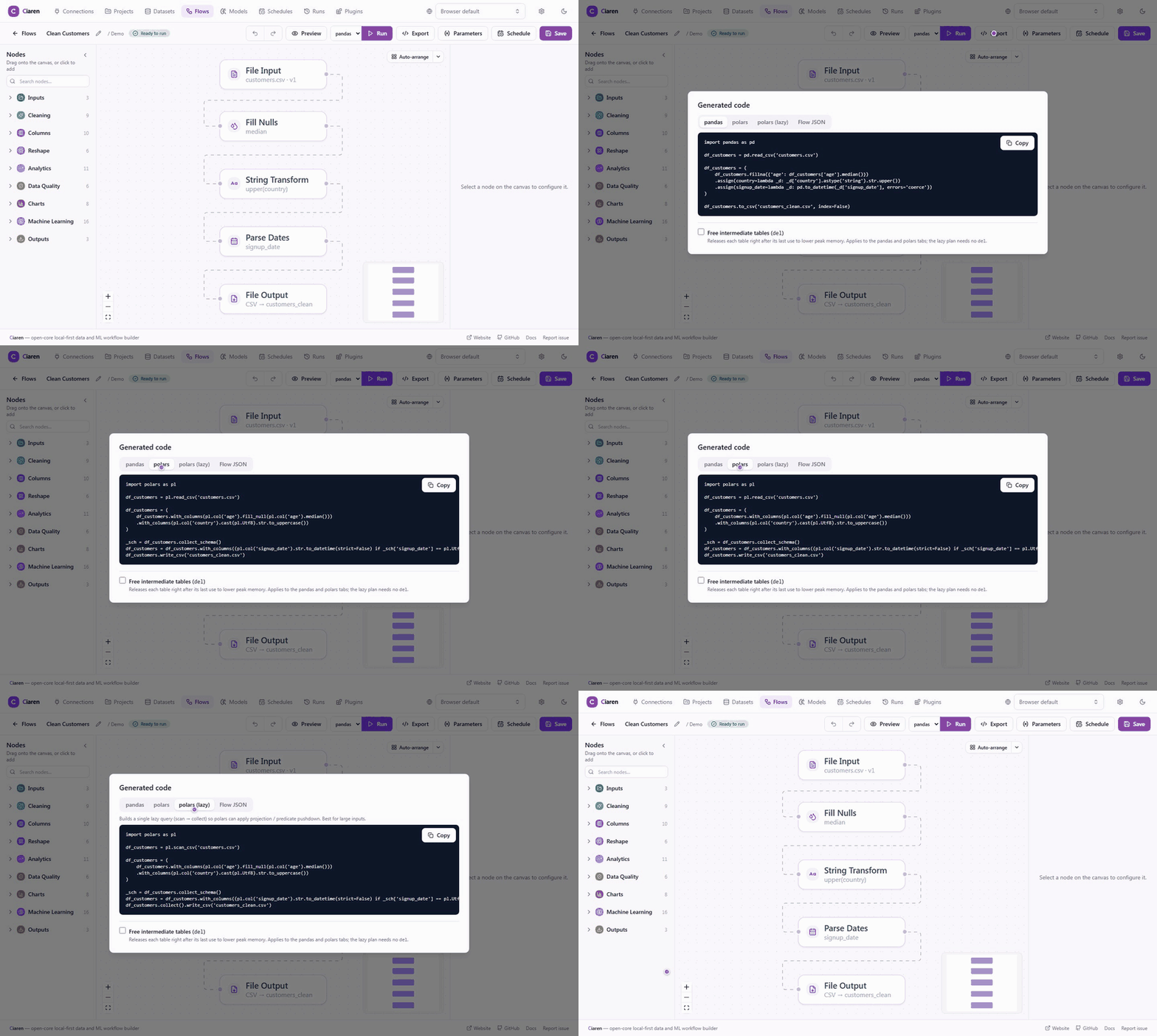
The export dialog shows three tabs for the same graph: pandas, eager Polars, and lazy Polars. For this flow, the lazy version swaps read_csv for scan_csv and calls .collect() once, just before the write, so Polars can push filters and column selection down into the scan.
Secrets stay out of the file
Any export that touches a database has to deal with credentials, and this is where I would look hardest at a tool I was evaluating. A connection in Ciaren stores a reference to a secret, never the password. The exported script resolves the same reference when it runs. With the password in an environment variable, a Postgres read produces this line (wrapped here for width):
_engine_1 = create_engine(URL.create(
    'postgresql+psycopg', username='etl', host='db.internal', port=5432,
    database='analytics', password=os.environ['PG_PASSWORD'],
))
If the connection points at the OS keychain instead, the same argument becomes keyring.get_password('ciaren', 'warehouse'). The URL is built with URL.create and each field is emitted as a quoted literal, so a hostname containing a quote character stays a string instead of turning into code in the exported script.
If a tool you are evaluating writes a plaintext password into its generated code, you would have to keep that file out of version control, and most of the value of having code is putting it in version control.
Check that the export matches the tool
Readable code is only useful if it does what the tool did when you pressed Run. In Ciaren, each transformation node is a class that must implement three methods: one that executes it through the active engine, one that emits pandas code, and one that emits Polars code. For those nodes, the code generators do not reimplement anything. They ask the node for its line of code.
The test suite then checks the pairing. For each node configuration in the codegen test cases, an equivalence test runs the node through the pandas or Polars engine, runs the emitted source on the same input with exec, and compares the two frames. A new codegen branch cannot be merged without equivalence data for it; a separate test enforces that. Other tests run whole exported scripts in a subprocess and compare the files they write.
This does not make the two engines identical. The docs say plainly that null handling, dtype inference, and row order can differ between pandas and Polars in edge cases. What the tests pin down is narrower: the pandas script matches the pandas engine, and the Polars script matches the Polars engine.
What you can do with the file
Once the script exists, it behaves like any other Python you own. You can commit it next to the flow and review changes in a pull request. You can run it from cron, a CI job, a container, or an Airflow task. If the flow has parameters, they appear as plain name = default assignments after the imports, so you can edit them or wire them to command-line arguments. For long flows with branches and joins, the export has an option to add del statements after each intermediate frame's last use, which lowers peak memory.
The generator itself is open source under AGPL-3.0. If you want to see how any of this is done, the pandas generator is backend/app/engine/codegen.py in the Ciaren repository, and the engines guide shows the same flow in all three dialects.