
"Local-first" gets used for desktop apps, self-hosted servers, and hosted products with an offline mode. For a data tool I find the label more useful as a list of defaults you can check. This post goes through those defaults for Ciaren, the open-source visual ETL tool I build, and then covers what running locally does not protect you from.
Why it matters for data work
A lot of pipeline work touches data that should not move around casually: customer lists, payroll exports, files a client shared under contract. With a hosted tool, the first step is sending that data to another company's servers, and in many organizations that needs a vendor review before anyone uploads a CSV. A tool that runs where the data already is skips that conversation for the common case. It also skips the upload.
The defaults, one by one
Out of the box, pip install ciaren and ciaren serve give you this:
| What | Default | Setting to change it |
|---|---|---|
| Network bind | 127.0.0.1:8055 | ciaren serve --host |
| App database | SQLite file ciaren.db | CIAREN_DATABASE_URL |
| Uploads, outputs, previews | .data/ directory | CIAREN_DATA_DIR |
| ML experiment tracking | MLflow in ./mlruns | CIAREN_MLFLOW_TRACKING_URI |
| Flow execution | Worker thread in the same process | CIAREN_EXECUTION_MODE |
| Scheduling | Built-in cron scheduler, no broker | None needed |
| Telemetry | None | None needed |
The bind address matters most. On 127.0.0.1, other machines on your network cannot reach the server at all. The API has no authentication by default because the model assumes one trusted user on their own machine. If you bind to 0.0.0.0 without setting CIAREN_API_TOKEN, ciaren serve prints a warning, since the API can run code through the Python transform node and plugin installs.
The SQLite default means the state of the app is a single file you can open with any SQLite client. Projects, flows, run history, and connection metadata are all in it. Postgres and MySQL work too if you want them, but nothing requires a database server.
Remote data sources are explicit. Ciaren can read from Postgres, Snowflake, SQL Server, MongoDB, S3, Azure Blob Storage, Google Cloud Storage, and REST APIs, and each of those is a connection you create. No node reads from or writes to a cloud service unless you pointed it there. Once installed, Ciaren runs offline.
Secrets are references
A connection never stores a password. It stores a reference, and the value is looked up when the connection is used:
| Reference | Where the value comes from |
|---|---|
PG_PASSWORD or env:PG_PASSWORD | An environment variable |
keyring:pg-main | The OS keychain: Windows Credential Manager, macOS Keychain, or Secret Service on Linux |
file:/run/secrets/pg_password | A file, which is how Docker and Kubernetes mount secrets |
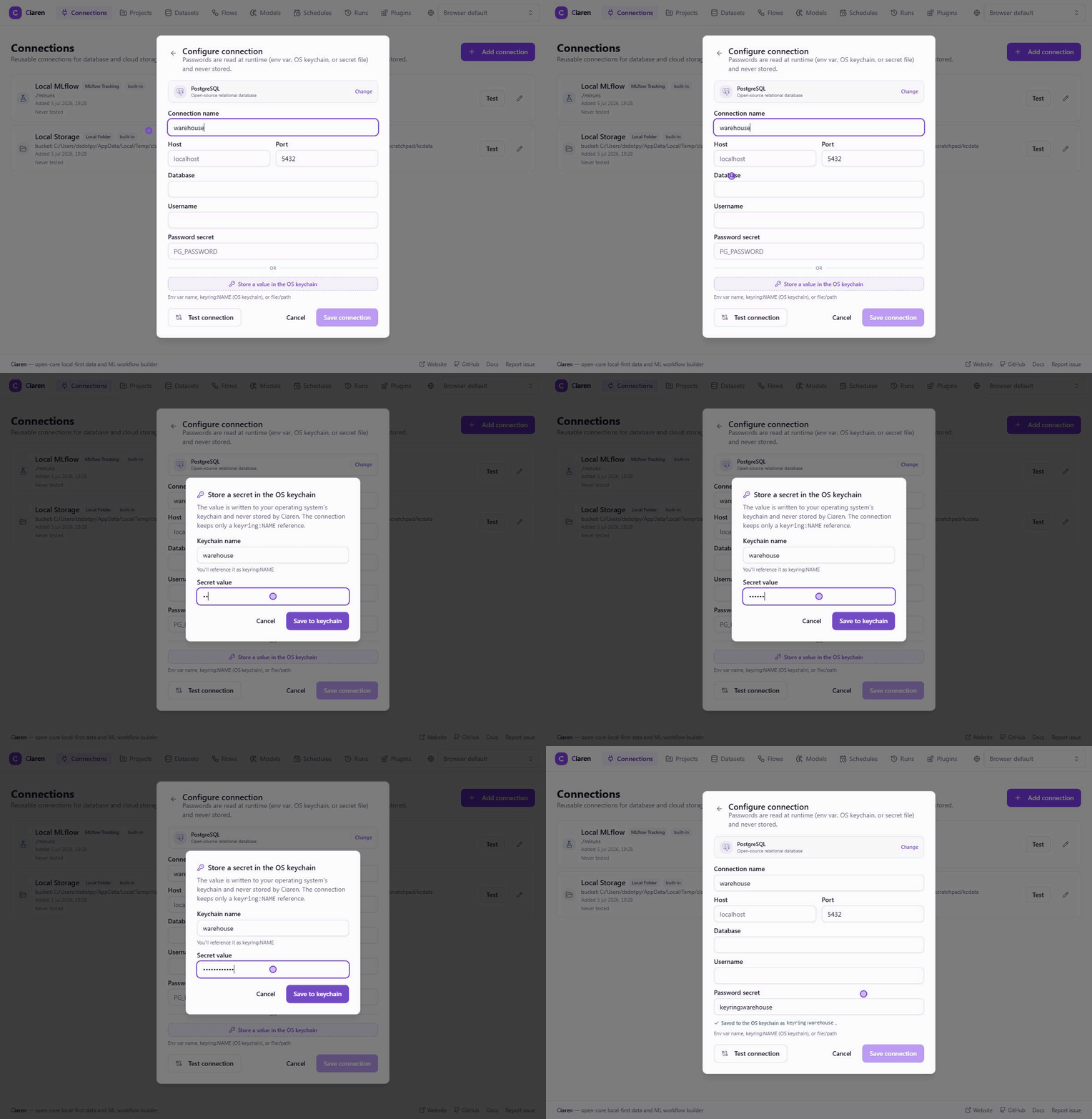
The same reference carries into exported Python. A flow that reads from a Postgres connection whose secret is keyring:warehouse exports with the lookup inline (abridged):
import keyring
from sqlalchemy import URL, create_engine

_engine_1 = create_engine(URL.create(
    'postgresql+psycopg', username='etl', host='db.internal', port=5432,
    database='analytics', password=keyring.get_password('ciaren', 'warehouse'),
))
This is worth checking in any tool, local or not. If credentials sit in the app's own database, every copy of that database is a copy of your credentials: backups, the file you attach to a bug report, the laptop you hand back to IT.
Localhost does not stop your browser
This one surprises people. Any web page you visit can send requests to http://127.0.0.1. CORS stops the page from reading the responses. It does not stop the request from arriving. A local tool with an unauthenticated API that changes state on a POST can be driven by a malicious page in another tab.
Ciaren refuses state-changing /api requests whose browser Origin header is not a configured CORS origin or a local hostname. Command-line clients such as curl send no Origin and are unaffected. If you run any local tool with a web UI and an open API, it is worth finding out whether it does something similar.
What local-first does not cover
Running on your machine settles where the data goes. It does not settle everything else, and the trust model in the docs is explicit about the gaps:
- Plugins and the Python transform node run with the same permissions as the Ciaren process. Plugin permissions are shown to you for approval before a plugin loads. That is a consent step; the plugin's code itself is not sandboxed.
- Data is stored unencrypted at rest. Disk encryption is your operating system's job.
- There are no users, roles, or per-project permissions. It is a single-user tool.
- Everything runs on one machine, so memory is the ceiling. The FAQ puts the practical range at up to a few gigabytes, depending on RAM. The Polars engine reads CSV and Parquet inputs in streaming batches to lower peak memory, but there is no distributed execution and no streaming data support.
Ciaren is also alpha software without a third-party security audit, and I would recommend it for controlled internal workflows while the project matures.
Local does not mean offline-only
None of this rules out the cloud. Your warehouse can be Snowflake and your files can live in S3. The exported Python runs the same in a cloud job or a container as on your laptop. What local-first changes is the starting point: the tool comes up on your machine with your files, and anything remote is something you added and can see in the connections list.
If you are evaluating a tool that calls itself local-first, the table near the top of this post is a reasonable checklist to fill in for it. Ciaren's source is on GitHub if you want to check its answers against the code.