
Transformations Reference
Ciaren ships with file/storage/SQL input/output nodes plus 66 registered transformation nodes for cleaning, reshaping, combining, validating, charting, analytics, and scripting data. Each node maps to one clear dataframe operation and contributes to the exported Python — in the pandas, polars, or lazy polars version.
This page is the map. Each node also has its own reference page with use cases, full configuration, generated code, and tips — follow the links below or use the sidebar.
Source of truth
The authoritative list lives in
backend/app/engine/registry.py.
Each node's type (shown on its page) is the value stored in the flow graph at
node.type; its settings live at node.data.config.
Node categories
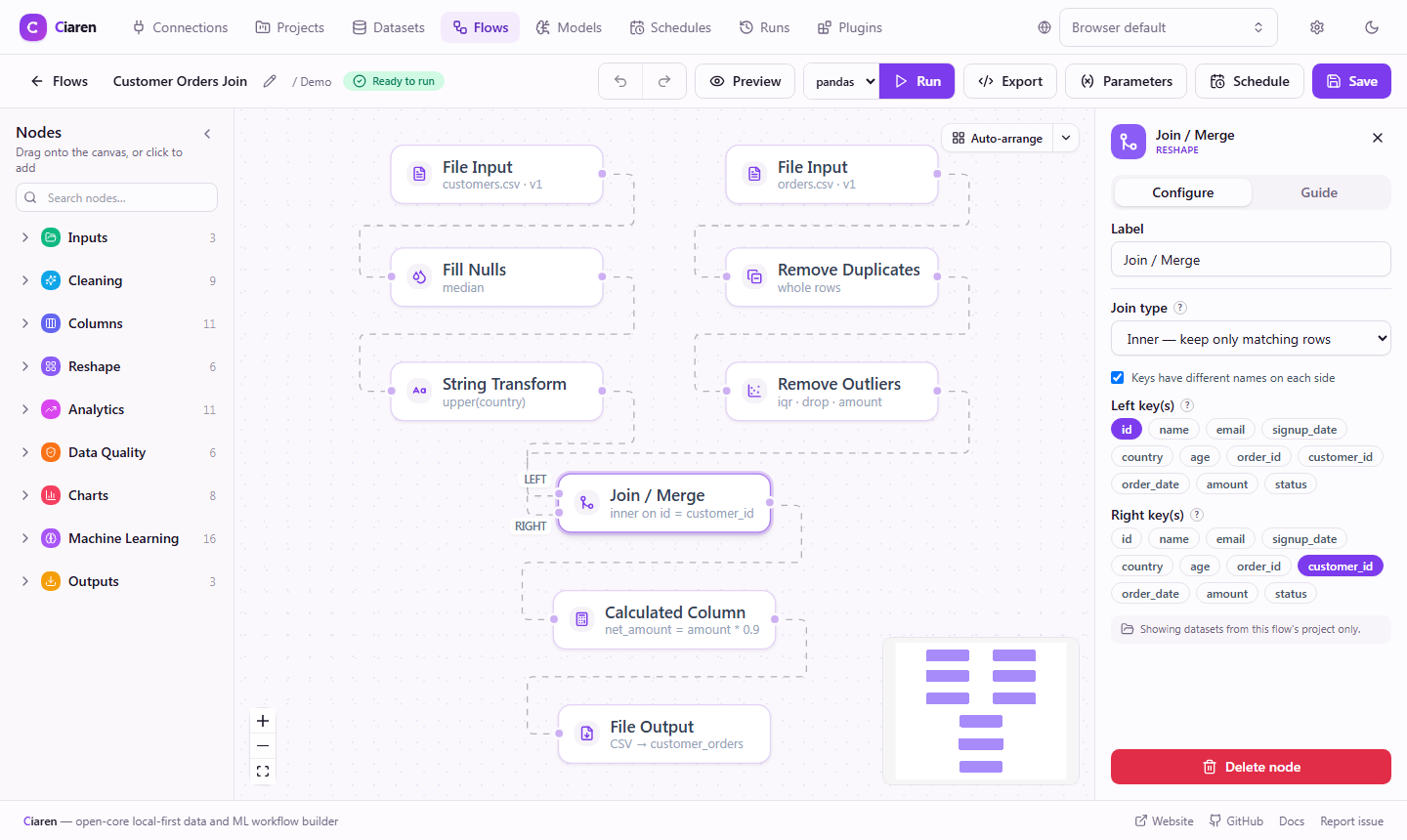
The node palette (left panel in the editor) groups all nodes into color-coded categories. Click a category to expand it, then drag a node onto the canvas or click to place it.
How nodes connect
A flow is a graph of nodes and edges (React Flow-compatible). Most nodes have
a single input handle (in) and output handle (out). Two are special:
- Join has two inputs:
leftandright. - Union / Concat accepts any number of inputs.
A minimal complete pipeline always starts with at least one Input node and ends with at least one Output node — or a terminal that persists a result on its own, like an ML train node or a chart node. Everything in between is optional cleaning and transformation.
- 1InputInput nodeFile · SQL · Storage
- 2CleanClean nodescolumns · nulls · rows · text · numeric
- 3TransformTransform nodesreshape · combine · analytics
- 4QualityQuality nodesassert contracts on your data
- 5OutputOutput nodeFile · SQL · Storage
Choosing the right node
| I want to... | Use |
|---|---|
| Remove columns | Drop columns |
| Fix column names | Rename columns |
| Keep only some columns | Select columns |
| Change a column's type | Change types |
| Remove rows with missing values | Drop nulls |
| Fill missing values | Fill nulls |
| Remove duplicate rows | Remove duplicates |
| Keep rows matching a condition | Filter rows |
| Filter on a multi-condition expression | Filter by expression |
| Join columns into one text field | Combine columns |
| First non-null across columns | Coalesce columns |
| Split a delimited/list column into rows | Split to rows |
| Moving average / rolling window | Rolling aggregate |
| Row-over-row delta or % change | Row difference |
| Days/hours between two dates | Date difference |
| Assert values are in an allowed set | Assert values in set |
| Create a new computed column | Calculated column |
| Sum / count / average by group | Group by + aggregate |
| Read an uploaded file | File input |
| Read from S3 / GCS / Azure Blob | Storage input |
| Write to S3 / GCS / Azure Blob | Storage output |
| Read from a database | SQL input |
| Combine two datasets on a key | Join |
| Stack datasets row-wise | Union / Concat |
| Reshape long ↔ wide | Pivot / Unpivot |
| Bucket a number into bands | Bin column |
| Split a date into year/month/… | Extract date parts |
| Turn date text into real dates | Parse dates |
| Split one column into several | Split column |
| Recode values (A→Pass, B→Pass…) | Map values |
| Rank, running total, lag/lead | Window function |
| Bucket with custom if/else logic | Conditional column |
| Assert a column has no nulls | Assert not null |
| Assert no duplicate rows | Assert unique |
| Assert values are within a range | Assert value range |
| Assert a boolean expression | Assert expression |
| Assert row count in bounds | Assert row count |
| Save a chart of the results on every run | Chart nodes |
| Run arbitrary Python on a frame | Python transform |
Generated code: pandas and polars
Every node implements both to_python_code (pandas) and to_polars_code
(polars), so exporting a flow gives you a runnable
script in either dialect. The per-node pages show the pandas export; the
polars export is equivalent and produced from the same config. The two engines
are kept at parity by a test suite that runs each node on both.
Current limitations
| Limitation | Workaround |
|---|---|
| Join takes two inputs at a time | Chain multiple join nodes |
rank/dense_rank rank by a single order column | Pre-sort, or use a calculated key |
calculatedColumn evaluates arithmetic expressions | For complex logic, use Conditional column, Python transform, or export and edit the Python |
pythonTransform scripts run without sandboxing | Ciaren is local-first — only run scripts from sources you trust |
Custom transformations
Need a node that isn't built in? Use Python transform
as an escape hatch for one-off scripts, build a
plugin node when you want a reusable extension. Core
nodes are kept selective; propose one in an issue only when it is broadly useful
and fits the lightweight built-in toolbox.
Each transformation implements validate_config, execute, to_python_code,
and to_polars_code, and is registered in app/engine/registry.py with tests.