
Built into the open-source install
Visual machine learning pipelines, tracked in MLflow
Ciaren lets you build visual machine learning pipelines on the same canvas as your data preparation. You split data, train a scikit-learn model, predict on the test set, and evaluate the result with nodes. Every trained model is logged to MLflow, and the flow exports as a scikit-learn script.
What it is
Train and score models without leaving the flow
A visual machine learning pipeline is a model workflow built as connected steps instead of a script. In Ciaren, you load and clean data, split it, train a model, score the test set, and read the metrics in one flow.
Train nodes save the fitted model to MLflow and pass a small model reference to the next node on a purple wire. Predict and Feature Importance load the model from that reference. The flow stays serializable, and model loading goes through Ciaren's safety checks.
Nothing extra is needed to start. A plain pip install includes scikit-learn, MLflow, and joblib. The ciaren init command sets up a local MLflow store in ./mlruns, and the demo project includes nine ML flows you can run on first start.
How it works
From raw data to a tracked model
Build
Clean, split, train, predict, and evaluate on one canvas
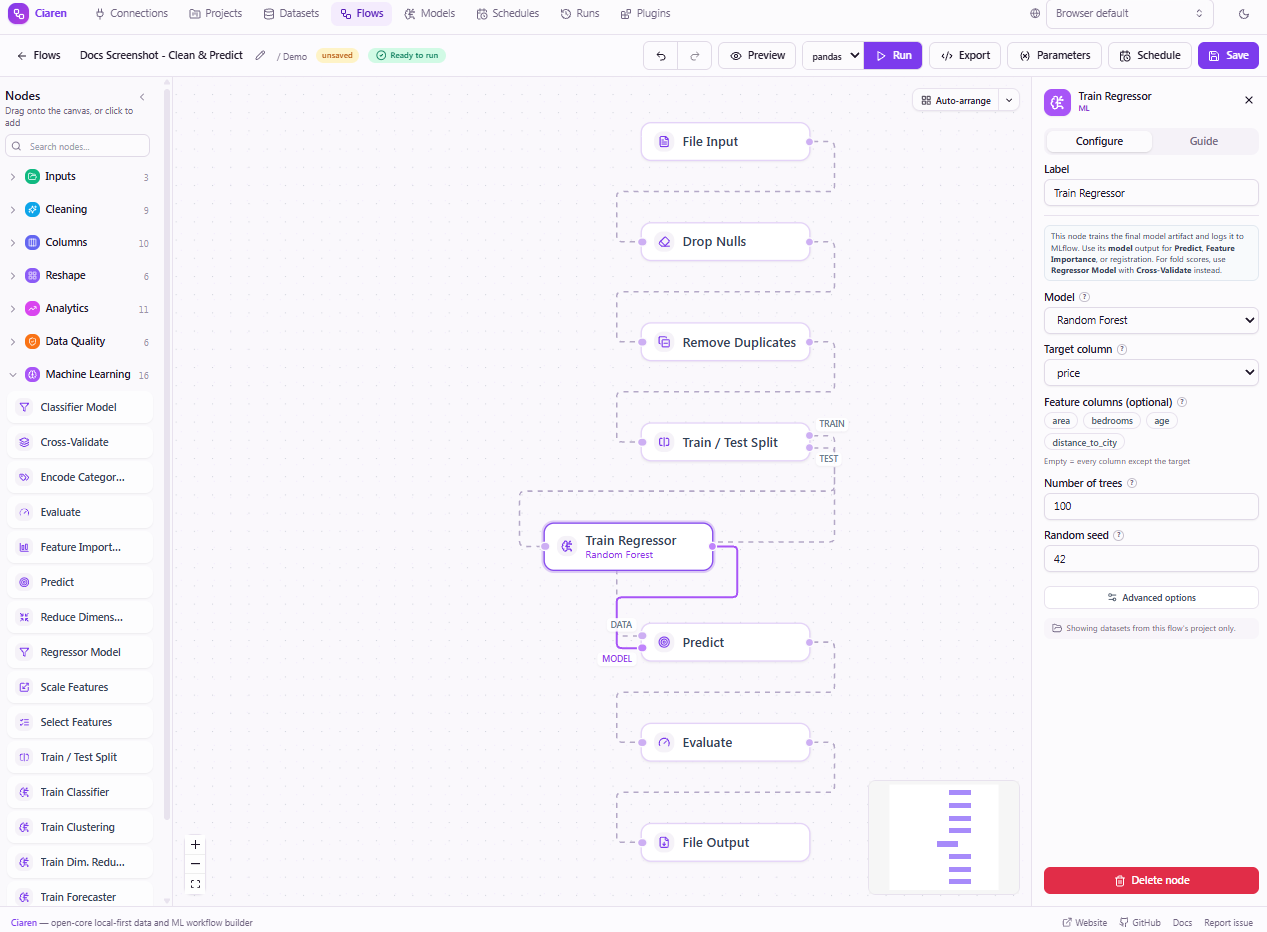
Connect a Train/Test Split to a Train Classifier or Train Regressor. Wire the test output and the model output into Predict, then add Evaluate for held-out metrics.
- The split needs a seed, so the same seed reproduces it
- Blue wires carry data. Purple wires carry a model reference.
Run
Read the metrics on the run
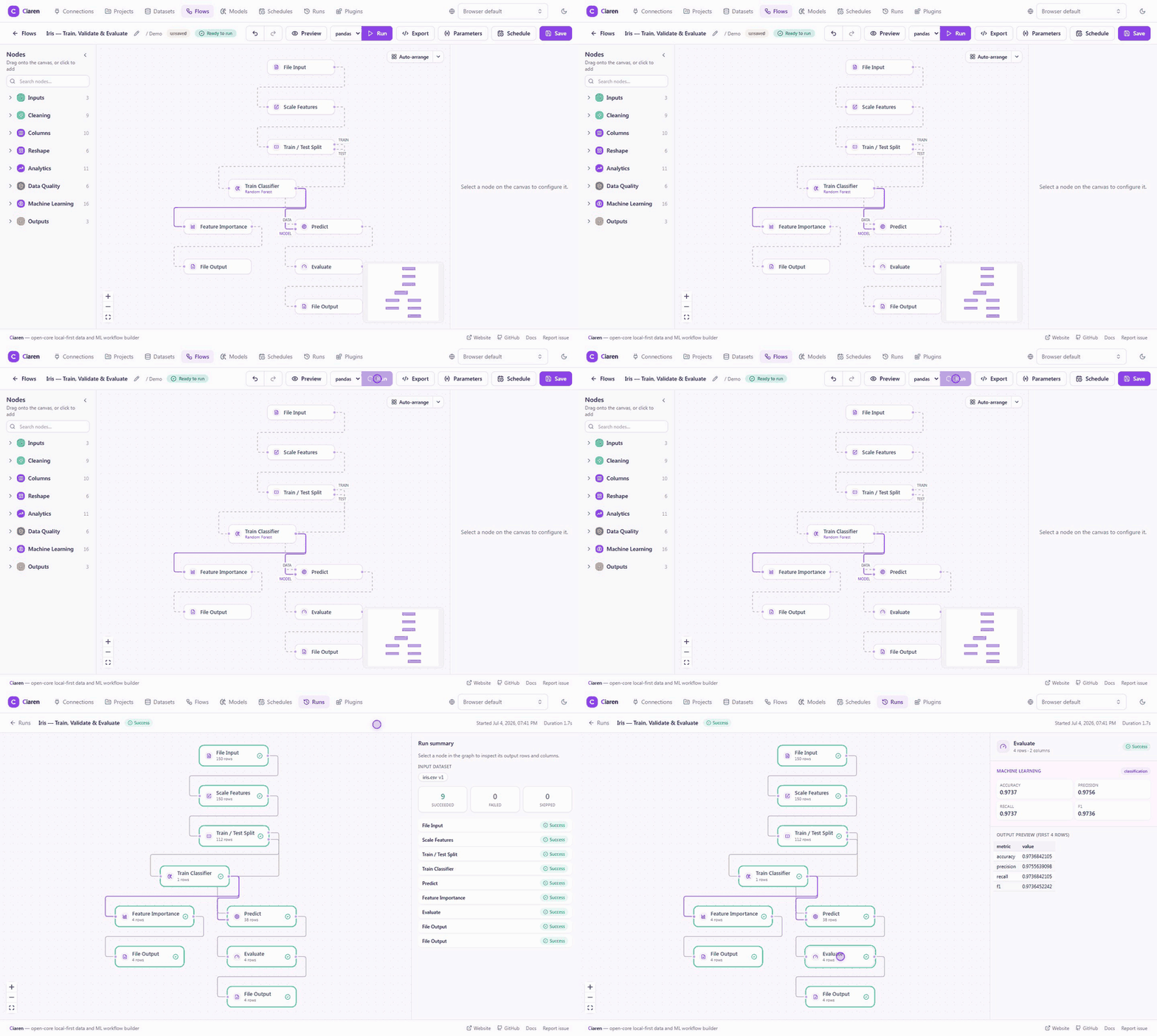
Run the flow and open the run. Each node shows its status and row count. The train node shows training metrics, a confusion matrix for classification, and the MLflow run ID.
- Evaluate reports accuracy, precision, recall, and F1
- Regression reports RMSE, MAE, and R²
Track
Compare runs and register models
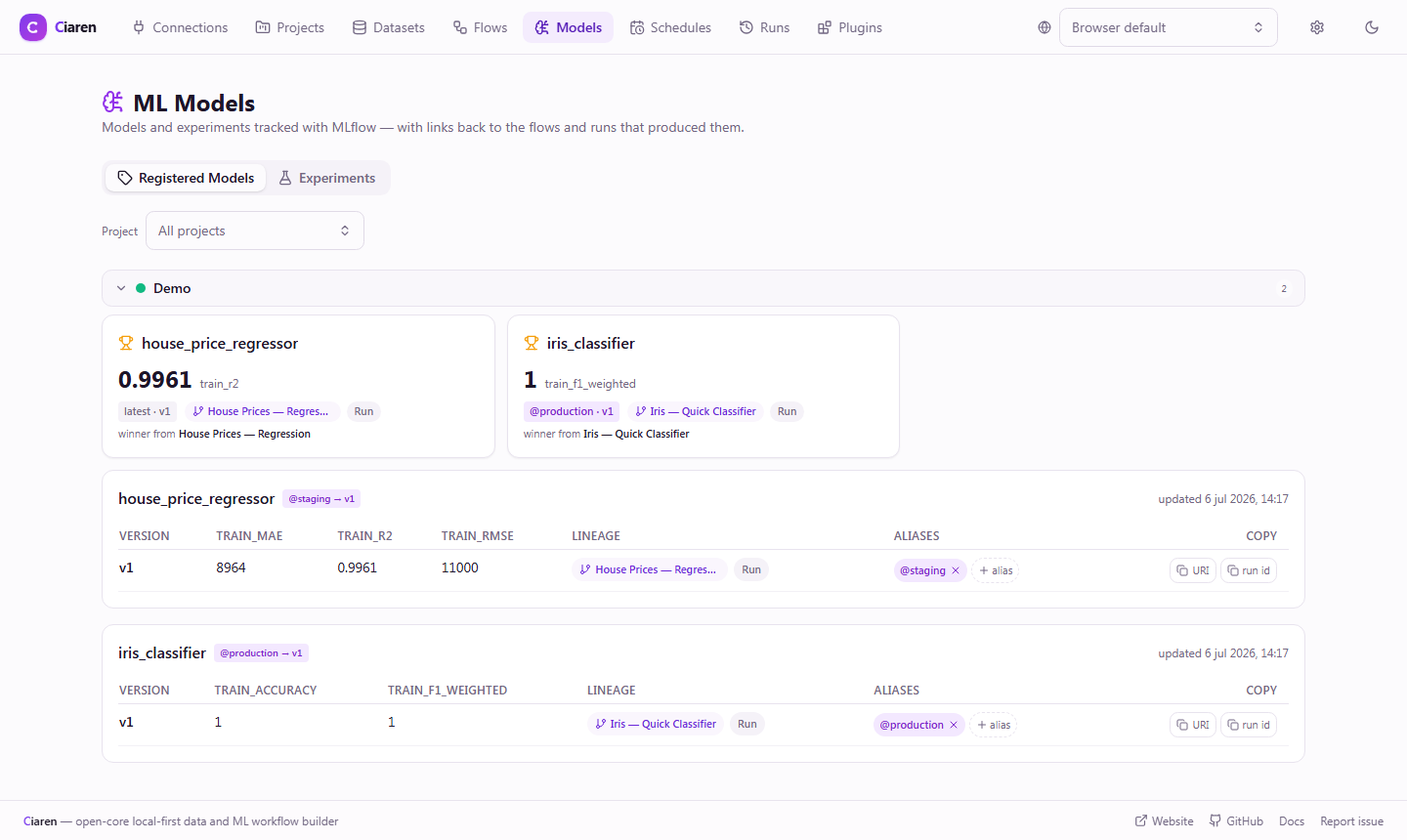
The Models page reads everything MLflow tracked. Registered models show their versions, aliases, key metrics, and links back to the flow and run that produced each version.
- An experiments leaderboard highlights the best value per metric
- Register a model from the train node's Machine learning panel
ML nodes and guardrails
What the ML palette includes
Exported code
The model as scikit-learn code
Export turns the split and training steps into a scikit-learn script. Preprocessing is bundled into a Pipeline, so it is applied the same way at predict time. The script runs anywhere scikit-learn is installed, without Ciaren.
import pandas as pd
from sklearn.compose import ColumnTransformer
from sklearn.ensemble import RandomForestClassifier
from sklearn.impute import SimpleImputer
from sklearn.model_selection import train_test_split
from sklearn.pipeline import Pipeline
from sklearn.preprocessing import OneHotEncoder, StandardScaler

df_customers = pd.read_csv('customers.csv')
df_1, df_2 = train_test_split(df_customers, test_size=0.25, random_state=42, stratify=df_customers['churn'])
df_1 = df_1.reset_index(drop=True)
df_2 = df_2.reset_index(drop=True)

_features = [c for c in df_1.columns if c != 'churn']
_X = df_1[_features]
_numeric = [c for c in _features if pd.api.types.is_numeric_dtype(_X[c])]
_categorical = [c for c in _features if c not in _numeric]
_transformers = []
if _numeric:
    _transformers.append(('num', Pipeline([('impute', SimpleImputer(strategy='median')), ('scale', StandardScaler())]), _numeric))
if _categorical:
    _transformers.append(('cat', Pipeline([('impute', SimpleImputer(strategy='most_frequent')), ('encode', OneHotEncoder(handle_unknown='ignore'))]), _categorical))
_preprocessor = ColumnTransformer(_transformers, remainder='drop')
_y = df_1['churn']
df_3 = Pipeline([('preprocessor', _preprocessor), ('model', RandomForestClassifier(random_state=42))])
df_3.fit(_X, _y)
Limits
Where the ML nodes stop
- They cover tabular data with scikit-learn estimators, plus XGBoost and LightGBM through the ciaren[ml] extra.
- Training runs on one machine. There is no distributed training.
- One training job accepts up to 5,000,000 rows and 500 feature columns by default. Both limits are settings.
Project status: pre-1.0 alpha
Ciaren is pre-1.0 alpha software for small and medium datasets on one machine. It is not built for distributed or streaming pipelines, datasets of 100 GB or more, or multi-user collaboration.
FAQ
Common questions
Read next
Docs and related pages
Train your first model on the canvas
Install Ciaren, open the demo project, and run one of the ML flows.