
Filter Paid Orders with Two Conditions
You want the orders that are paid and worth at least 100. A Filter Rows node tests one condition; Filter by Expression tests both in one expression and keeps a row only when the whole expression is true.
You'll use: File Input → Filter by Expression → File Output.
- 1InputFile Inputorders.csv
- 2CleanFilter by Expressionamount ≥ 100 and status paid
- 3OutputFile Outputpaid_orders
Sample data
Save this as orders.csv. It has one unpaid order and paid orders below, at
and above 100.
order_id,amount,status
ORD-1001,250.00,pending
ORD-1002,99.99,paid
ORD-1003,100.00,paid
ORD-1004,180.50,paid
Steps
-
On Datasets, upload
orders.csv. -
In a new flow, add File Input. Set File type to CSV and Dataset to
orders.csv. -
Add Filter by Expression and type this into Expression:
amount >= 100 and status == 'paid'You can also build it with Build condition: pick
amount, ≥ greater or equal and100, click Use condition, then pickstatus, = equals andpaid, and click AND. -
Add File Output. Set File type to CSV (.csv) and Dataset name to
paid_orders. Connect the nodes in order and click Run.
Result
| order_id | amount | status |
|---|---|---|
| ORD-1003 | 100.00 | paid |
| ORD-1004 | 180.50 | paid |
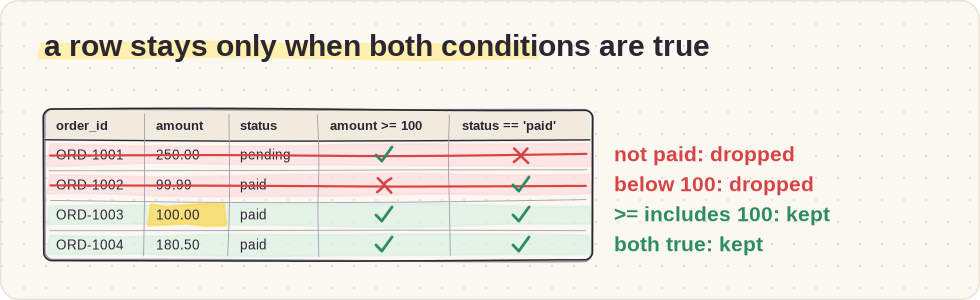
ORD-1003 stays because >= includes 100. ORD-1001 is worth 250 but is not
paid, so and drops it.
Check the result
Save the flow, click Preview, select the Filter by Expression node and
click Run preview. You should see exactly ORD-1003 and ORD-1004. If
ORD-1001 appears, the expression uses or instead of and. If ORD-1003 is
missing, it uses > instead of >=.
Pitfalls
- Use
==and quote text.status == 'paid'compares with a text value; with a single=the node fails. - Text must match exactly.
Paidorpaidwith a trailing space does not equal'paid', so those orders are dropped. Clean the column first, see Clean Messy Text. - Missing values fail the test. An order with an empty
amountorstatusis dropped, because a comparison with null is false. - Use
amount > 100if an order of exactly 100 should not count.
Exported Python
Click Export in the editor toolbar. The pandas and polars tabs show
this code for the flow. It reads orders.csv from the script's folder and
writes paid_orders.csv.
import pandas as pd

df_orders = pd.read_csv('orders.csv')
df_orders = df_orders.query("amount >= 100 and status == 'paid'").reset_index(drop=True)
df_orders.to_csv('paid_orders.csv', index=False)
The expression uses pandas syntax on both engines. The Polars script therefore
converts the frame with to_pandas() to evaluate it, which needs pandas and
PyArrow installed next to Polars.