
One Row per Tag While Preserving Record IDs
Each article has a tags field such as news;sports, and you want one row per
tag so you can count or join on tags. Split to Rows splits the text and
gives each piece its own row, repeating the other columns. It adds rows;
Split a Column adds columns instead.
You'll use: File Input → Split to Rows → String Transform → File Output.
- 1InputFile Inputarticles.csv
- 2TransformSplit to Rowstags · delimiter ;
- 3TransformString Transformtags · Strip spaces
- 4OutputFile Outputarticle_tags
Sample data
Save this as articles.csv. Record r3 has no tags, r4 ends with a
delimiter, and r5 has a space after the delimiter.
record_id,tags
r1,news;sports
r2,news
r3,
r4,a;
r5,news; sports
Steps
- On Datasets, upload
articles.csv. - In a new flow, add File Input. Set File type to CSV and Dataset
to
articles.csv. - Add Split to Rows. Set Column to
tagsand Delimiter (optional) to;. - Add String Transform. Set Column to
tagsand click Strip spaces. Without it,r5gets the tag" sports", which does not matchsports. - Add File Output. Set File type to CSV (.csv) and Dataset name to
article_tags. Connect the nodes in order and click Run.
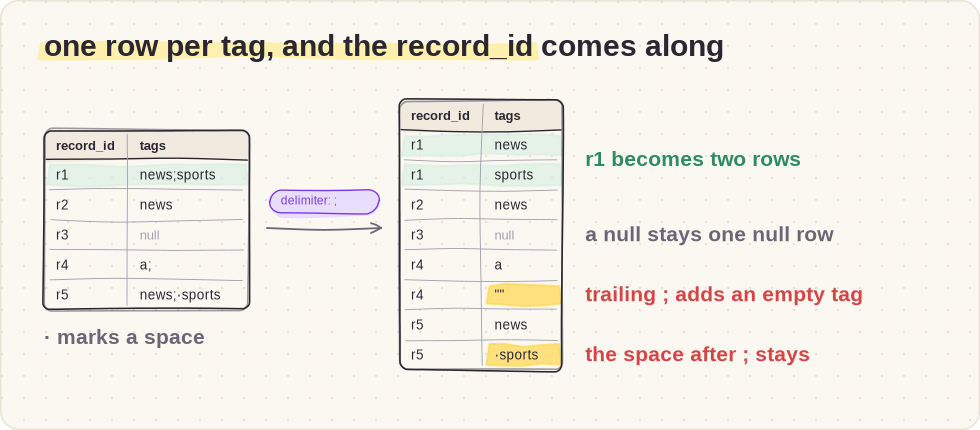
Result
Five records become eight rows:
| record_id | tags |
|---|---|
| r1 | news |
| r1 | sports |
| r2 | news |
| r3 | null |
| r4 | a |
| r4 | empty text ("") |
| r5 | news |
| r5 | sports |
Check the result
Save the flow, click Preview, select the String Transform node and click
Run preview. You should see 8 rows, with r1 and r5 on two rows each.
Switch to Profile: tags should list news 3 times and sports 2 times.
If sports appears only once, the Strip spaces step is missing.
Pitfalls
- A null stays one row.
r3keeps one row with a null tag, so the record does not disappear. - A trailing delimiter adds an empty tag.
a;givesaand an empty text. Remove such rows with Filter by Expression, for exampletags != '', which drops the empty tag and keeps the null row. - Null and empty text look alike in a CSV. Both are written as an empty
cell by the pandas engine; Polars writes the empty text as
"". Check the preview, not the file. - Pick the delimiter the data uses. With the default
,, nothing in this sample is split.
Exported Python
Click Export in the editor toolbar. The pandas and polars tabs show
this code for the flow. It reads articles.csv from the script's folder and
writes article_tags.csv.
import pandas as pd

df_articles = pd.read_csv('articles.csv')

df_articles = (
    df_articles.assign(tags=lambda _d: _d['tags'].astype('string').str.split(';'))
    .explode('tags')
    .reset_index(drop=True)
    .assign(tags=lambda _d: _d['tags'].astype('string').str.strip())
)

df_articles.to_csv('article_tags.csv', index=False)