
Engines (polars / pandas)
Engines: polars & pandas
Ciaren executes flows through a small engine abstraction, so the same visual flow runs on either polars or pandas. Every transformation node is engine-agnostic — it knows how to run on both and how to generate code for both.
The default is polars
The default dataframe engine is polars (settings.DEFAULT_ENGINE = "polars").
polars is fast and memory-light on small-to-medium data, which suits Ciaren's
target use cases. pandas is fully supported and remains a first-class choice.
You can change the server-wide default:
# backend/.env
CIAREN_DEFAULT_ENGINE=pandas
# or per process
ciaren serve --engine pandas
Choosing an engine per run
A single run can override the default. In the UI, pick the engine when you run a flow; over the API, pass it in the run body:
curl -X POST http://localhost:8055/api/flows/{flow_id}/runs \
  -H "Content-Type: application/json" -d '{"engine": "pandas"}'
The chosen engine is recorded on the run, so the run is reproducible and you can see which engine produced a given output.
Code export: pandas, polars, and lazy polars
POST /api/flows/{flow_id}/export/python returns three versions of the flow's
code, all generated from the same graph. In the editor's Generated code dialog
they appear as three tabs (click Export in the toolbar):
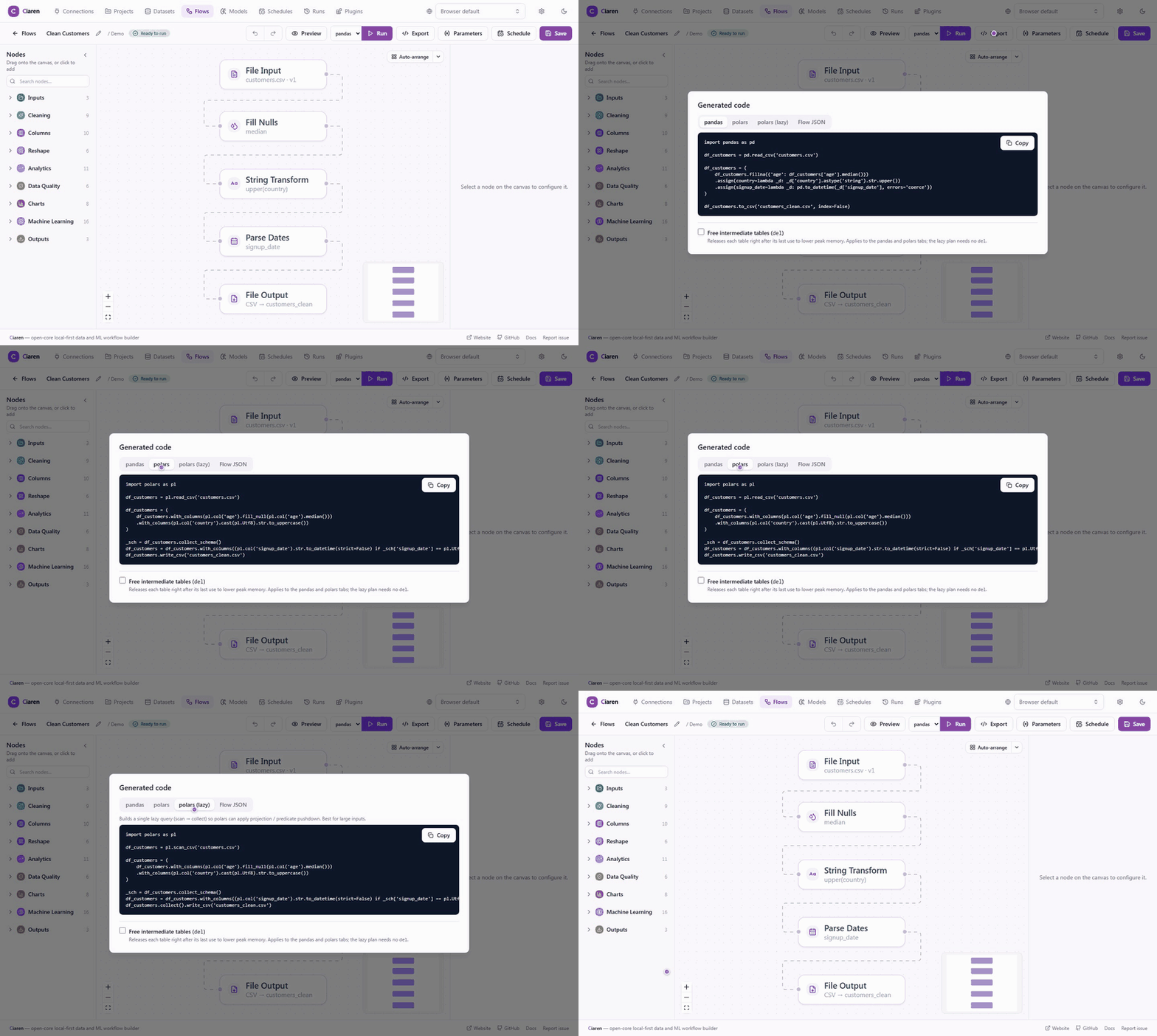 All three are standalone and readable — use whichever
your downstream code prefers.
All three are standalone and readable — use whichever
your downstream code prefers.
import pandas as pd

df_sales = pd.read_csv('sales.csv')

df_sales = (
    df_sales.dropna(subset='amount')
    .groupby('region')
    .agg({'amount': 'sum'})
    .reset_index()
)

df_sales.to_csv('summary.csv', index=False)
Each input frame is named after its dataset file (sales.csv → df_sales) or
SQL table, so the script talks about your data, not df_1. Steps on a straight
chain fuse into one fluent method chain on a single variable, the way a person
would write it, and blank lines separate the reads, each chain, and the writes.
A step whose result feeds several later nodes (a fan-out, or a join input)
keeps its own df_N variable, since it must stay alive for every consumer.
Lazy polars (for large inputs)
The polars (lazy) variant reads with scan_* and builds a single
LazyFrame query that only materializes at the final collect(). This lets
polars apply projection and predicate pushdown (read fewer columns, filter at the
scan) and optimize joins — a real speedup on large files for no change in results.
Some nodes have no lazy equivalent — Pivot,
Sample rows,
Remove outliers,
Bin column,
Filter by expression,
Python transform, and the six
Data Quality assert nodes (Assert not null, Assert unique, Assert value
range, Assert expression, Assert values in set, Assert row count). The lazy
export materializes around just those steps (.collect() … .lazy()) and
keeps the rest of the plan lazy.
| Export dialect | When to choose |
|---|---|
| pandas | Existing pandas workflows, Jupyter notebooks, team familiarity |
| polars (eager) | Default — fast, low-memory, idiomatic polars |
| polars (lazy) | Large files; lets polars push down filters and projections |
Freeing intermediates (lower peak memory)
Pass ?free_intermediates=true (the Free intermediate tables (del) checkbox
in the export dialog) to add a del after each dataframe's last use in the pandas
and eager-polars scripts. This releases intermediate tables sooner, lowering peak
memory on long pipelines. A fully linear flow already reuses one variable
throughout, so it has nothing to del — the option matters for flows with
fan-outs or joins, where intermediates outlive the next step. The lazy script is
unaffected — its variables are query plans, not materialized data, so there is
nothing to free.
Streaming reads at runtime (polars)
The above is about exported code. Inside Ciaren, the polars engine also
loads CSV and Parquet inputs with a streaming reader (scan_* + a streaming
collect), so a large input file is parsed in batches instead of all at once —
lower peak memory at the point that usually dominates it. The result is identical
to a plain read, so nothing else about your flow changes. (The pandas engine
reads eagerly.)
Execution mode: thread vs. process
Flow compute is synchronous (pandas/polars), so Ciaren runs it off the event
loop to avoid blocking the API. EXECUTION_MODE selects how:
| Mode | Parallelism | Notes |
|---|---|---|
thread (default) | GIL-limited across runs; polars is still multi-core within a run | Simplest and fully featured (precise cancel, plugin node hooks); the right choice for local/interactive use |
process | True multi-core across concurrent runs | Crash isolation and real timeout enforcement, but coarser cancel, no node-level plugin hooks, and slower first run (worker spawn); only picklable args cross the boundary — the DB session stays in the parent |
ciaren serve --execution-mode process
Recommendation: stay on thread unless Ciaren runs as a long-lived shared
server with scheduled jobs, or you need concurrent pandas-heavy runs to use
multiple cores. The full decision guide — including cancellation, timeout, and
plugin-hook trade-offs — is in
Advanced Setup → Execution tuning.
Run timeouts
RUN_TIMEOUT_SECONDS (default 0 = no limit) abandons a run that overruns:
- in
processmode, the worker process is recycled to reclaim the CPU — immediately if no other run shares the pool, otherwise deferred until they finish, so one hung run can't abort its neighbors; - in
threadmode, the run is abandoned (the thread itself finishes).
# backend/.env
CIAREN_RUN_TIMEOUT_SECONDS=300
Each node also records a duration_ms in the run, so you can spot the slow step.
Notes & gotchas
- The two engines aim for equivalent results, but edge cases (null handling, dtype inference, ordering) can differ. The exported code mirrors exactly what each engine does.
calculatedColumnuses pandasdf.evaland polarspl.sql_exprunder the hood — keep expressions to arithmetic over columns (e.g.price * quantity).
See also
- Transformations Reference — per-node generated code
- CLI Reference —
--engine,--execution-mode, and env vars - Projects & Runs — inspecting run results