
Getting Started
Getting Started with Ciaren
Ciaren is a visual workflow builder for local data engineering and lightweight machine-learning work. You build flows — Ciaren's word for a saved pipeline — on a canvas, preview real data at each step, run them locally, and export readable pandas, polars, or lazy polars Python.
If you are new to the project, start here. This page gives you the mental model before you install anything.
Alpha software
Ciaren is in early development. APIs, generated code, workflow files, and plugin contracts may change between releases. Use it for learning, experimentation, prototypes, and controlled internal workflows before relying on it for critical production jobs.
The Short Version
Ciaren sits between three familiar tools:
| If you know... | Ciaren feels like... |
|---|---|
| Spreadsheets | A repeatable, inspectable flow instead of a sequence of manual edits |
| Notebooks/scripts | A visual way to design pipelines that still exports normal Python |
| Orchestrators | A lighter local tool for building and running one flow without cluster setup |
It is not trying to hide Python. It is trying to make dataframe workflows easier to design, inspect, teach, share, and export.
What You Can Build
Each node has configuration, preview output, and generated code. That matters: you can explain a flow to a beginner, inspect it as an engineer, and move the result into a regular Python workflow when you need full control.
Why Ciaren Exists
Many data tools force an early tradeoff:
- spreadsheets are approachable, but hard to reproduce and review;
- notebooks are flexible, but can become fragile execution histories;
- orchestration systems are powerful, but heavy for local exploration;
- no-code tools can be fast, but often trap work inside a proprietary runtime.
Ciaren's answer is a local, plugin-first workflow model where the visual graph is the product experience and Python export is the escape hatch. You can start with the UI and still end with code.
Who It Is For
- Data analysts: clean, join, validate, and export datasets without writing every operation by hand.
- Python learners: see how visual dataframe operations become pandas and polars code.
- Data engineers: prototype repeatable flows locally, review generated code, and use the CLI/API for automation.
- ML practitioners: move from raw data to tracked lightweight ML workflows on the same canvas.
- Plugin authors: add custom nodes, connectors, engines, model providers, exporters, and validators without changing core.
- Contributors: improve the editor, execution engine, transformations, examples, docs, tests, and plugin SDK.
What You Need First
For the fastest evaluation:
- Python 3.12+ for the PyPI package;
- Docker if you prefer an isolated container;
- a browser to open the visual editor;
- five minutes to inspect the Demo project or build a small flow.
You do not need your own dataset. Fresh installs seed a Demo project with sample datasets and working flows.
Choose Your Path
| Goal | Start here |
|---|---|
| "I just want to see it running" | Installation, install from PyPI or use Docker, then open the Demo project |
| "I want to build my first flow" | Quick Start |
| "I want to understand the UI" | Interface Tour |
| "I want a realistic example" | Sales Analysis or Data Quality Checks |
| "I care about generated code" | Engines and Python export |
| "I want to automate it" | CLI Reference, REST API, and Python SDK |
| "I want to extend it" | Plugins Overview and Build Your First Plugin |
| "I want to contribute" | CONTRIBUTING.md and Roadmap |
What Ciaren Is Not
Ciaren is designed for local, single-machine workflows. It is not currently:
- a distributed compute engine like Spark;
- a real-time streaming platform;
- a full Airflow/dbt replacement;
- a multi-user enterprise collaboration system;
- a tool for unbounded 100GB+ local datasets.
It does include a lightweight scheduler for running individual flows on a cron schedule. See Scheduling.
Quick Preview
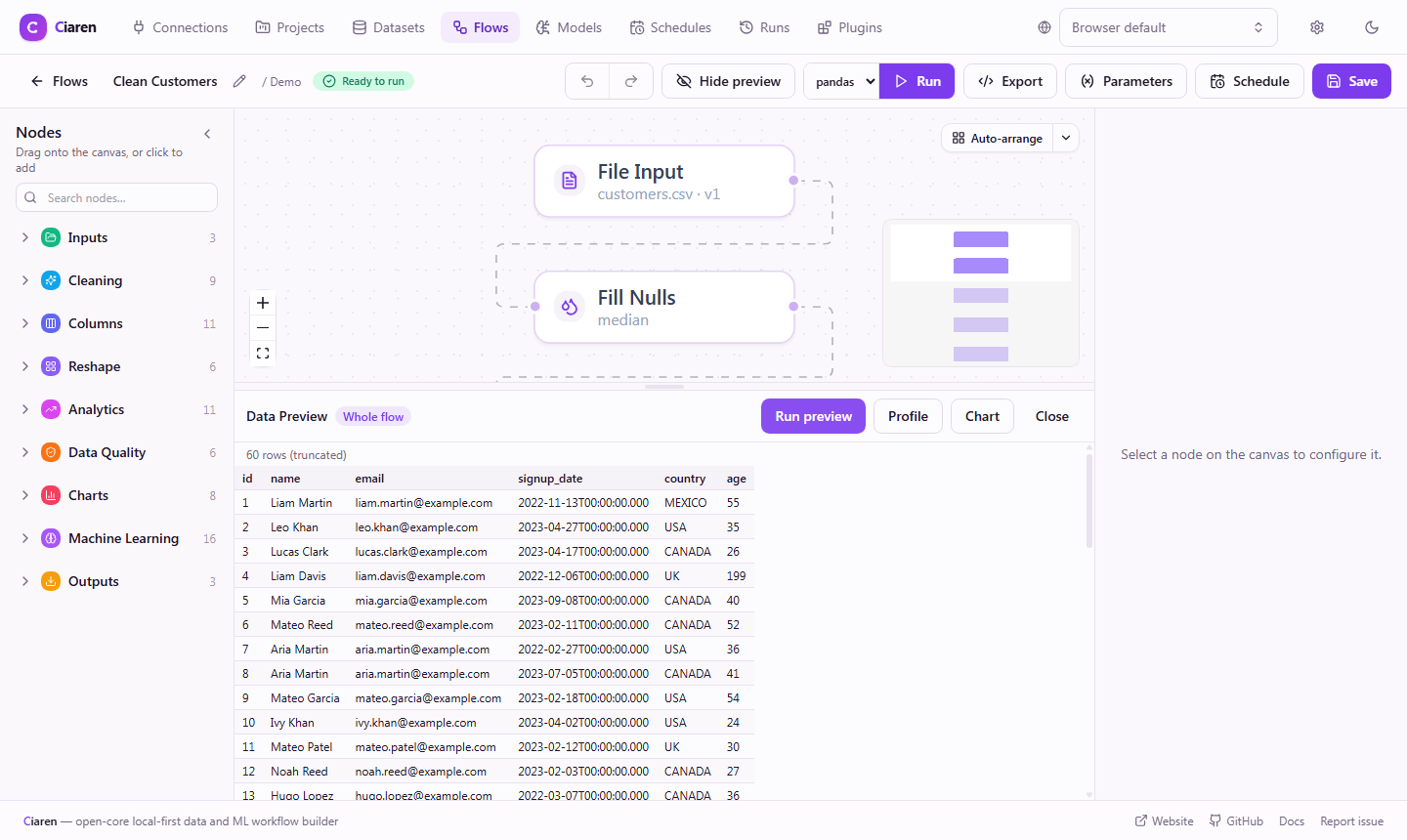
Here is the kind of pipeline you will build in the Quick Start:
Next Step
Install Ciaren and open the Demo project:
python -m pip install ciaren
ciaren serve
Then open http://localhost:8055.