
ML Model Plugins
ML Model Plugins
Plugins can extend Ciaren's machine learning in two complementary ways:
- Contribute a model type (
ModelProvider) — your algorithm appears inside the standard Train Classifier / Train Regressor / … model picker, next to the built-ins, and trains through the exact same pipeline: preprocessing bundled into an sklearnPipeline, hyperparameter sanitization, size limits, MLflow logging, and Python-code export. You only supply the estimator. - Ship a train node (
NodeProvider+ amodel-typed output port) — a fully custom node that fits whatever it wants, persists the result through the host's ModelStore, and emits a typed model reference that the core Predict, Feature Importance, and registry features consume.
The bundled MLP Classifier example does both — it is the reference implementation for this page.
Model references: what travels on a model wire
A train node never passes a raw estimator downstream. It emits a model
reference — a one-row frame pointing at a persisted artifact (an MLflow
runs://models:/ URI) plus the metadata consumers need. ModelRef freezes
that layout as a public contract:
from app.plugin_api import ModelRef

ref = ModelRef(
    task_type="classification",
    model_type="mlp_classifier",
    mlflow_run_id="…", model_uri="runs:/…/model",
    target_column="churn", feature_columns=("age", "tenure"),
)
frame = ref.to_frame()          # what you return on a "model" output handle
ref2 = ModelRef.from_frame(frame)  # what you parse from a "model" input handle
Passing references instead of live objects keeps graphs serializable, keeps execution engine-agnostic, and keeps model loading behind the host's security checks (URI allowlist, artifact-root confinement, format allowlist) — see Security.
Path 1 — contribute a model type
from app.plugin_api import ModelProvider, ModelTypeSpec

class MyModels(ModelProvider):
    def model_types(self):
        return [
            ModelTypeSpec(
                id="mlp_classifier",
                label="MLP (neural network)",
                task="classification",          # picks the train node it appears in
                provider="community.mlp-classifier",
                requires=("sklearn",),           # marked unavailable when missing
                install_hint="pip install scikit-learn",
                default_hyperparameters={"hidden_layer_sizes": "100", "max_iter": 200},
                hyperparameter_schema={"fields": [
                    {"key": "hidden_layer_sizes", "label": "Hidden layers", "type": "string"},
                    {"key": "max_iter", "label": "Max iterations", "type": "integer", "min": 1},
                ]},
                import_lines=("from sklearn.neural_network import MLPClassifier",),
            )
        ]

    def model_builders(self):
        def build(hyperparameters: dict, seed: int | None):
            from sklearn.neural_network import MLPClassifier
            params = dict(hyperparameters)
            if seed is not None and "random_state" not in params:
                params["random_state"] = seed
            return MLPClassifier(**params)
        return {"mlp_classifier": build}
Register it in your plugin's register():
def register(self, registry):
    registry.register_model_provider(MyModels())
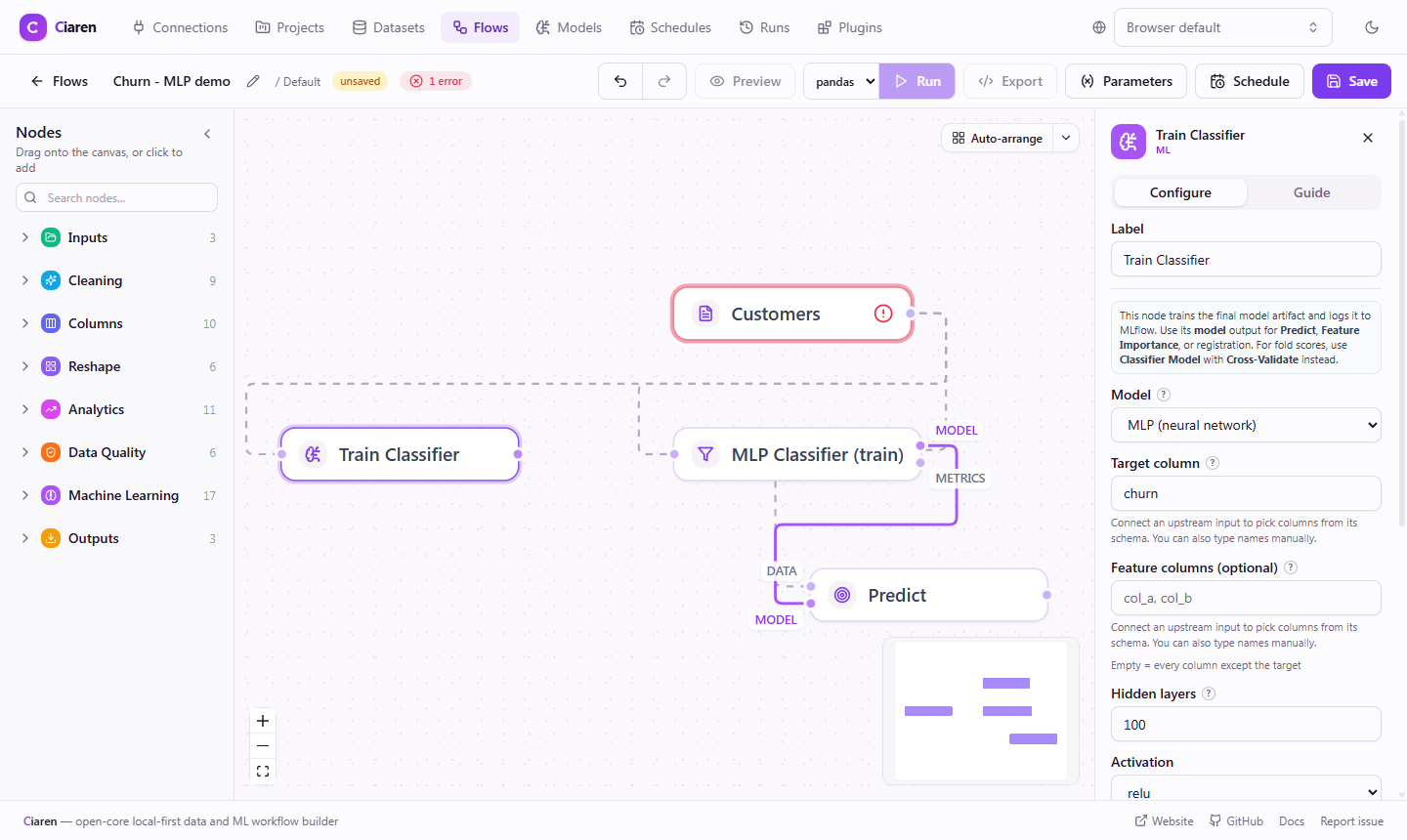
What you get for free:
- The type shows up in the matching train node's model picker (with an
install warning when
requiresmodules are missing), and itshyperparameter_schemarenders real controls in the sidebar. - Training runs through the core pipeline — preprocessing,
ML_MAX_*limits, MLflow logging with pinned requirements and a signature, and metrics. - Code export works: the exported script rebuilds your estimator via its
repr()and the derived/declared import lines. - The model reference feeds Predict, Feature Importance, Cross-Validate, and model registration, exactly like a built-in.
The builder's hyperparameters arrive already sanitized to JSON-native values
(never eval-ed), with your default_hyperparameters merged in under whatever
the user set — an untouched form trains with the defaults the catalog
advertises. Raise ValueError on anything your estimator can't accept, and
inject the run seed yourself unless the user set one explicitly (as build
above does).
Path 2 — ship a train node
Declare a node with a typed model output (and mark it a flow terminal so a
flow can end at it):
NodeSpec(
    id="sklearn.mlpClassifierTrain",
    label="MLP Classifier (train)",
    category="ml",
    provider=PLUGIN_ID,
    inputs=(PortSpec(id="in"),),
    outputs=(
        PortSpec(id="model", type="model"),   # a model wire — only connects to model inputs
        PortSpec(id="metrics"),               # a regular dataframe output
    ),
    is_model_sink=True,
    is_flow_terminal=True,
    config_schema={"fields": [
        {"key": "target_column", "type": "column", "required": True},
        # … the editor renders this form; no frontend code needed
    ]},
)
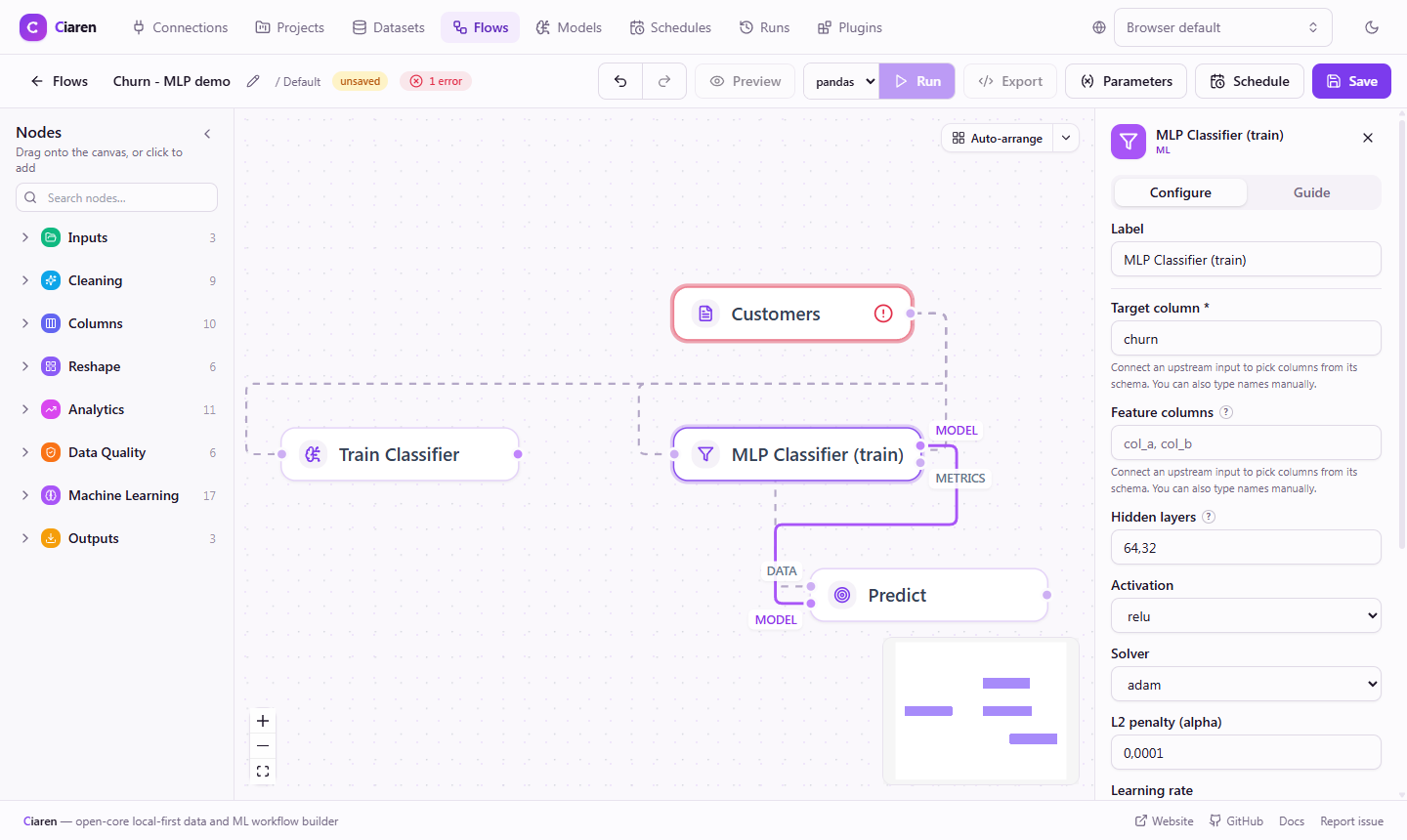
Graph validation enforces the wire types for you: a plugin model output can
only feed a model input (core or plugin), and never a file output.
In the runtime, override execute_with_context and persist through the host's
ModelStore:
from app.plugin_api import NodeContext, NodeRuntime, ModelRef

class TrainRuntime(NodeRuntime):
    def execute_with_context(self, inputs, config, context: NodeContext):
        if context.in_preview:
            # Previews run on sampled data — don't fit or persist anything.
            placeholder = ModelRef(task_type="classification", model_type="mlp_classifier")
            return {"model": placeholder.to_frame(), "metrics": pd.DataFrame()}

        clf = MLPClassifier(...).fit(X_train, y_train)

        if context.models is None:
            raise ValueError("this server has no ML/MLflow support installed")
        ref = context.models.log_sklearn_model(
            clf,
            model_type="mlp_classifier",
            task_type="classification",
            target_column=target,
            feature_columns=tuple(features),
            params=hyperparameters,   # recorded as the reference's hyperparameters
            metrics={"test_accuracy": acc},
            seed=seed,
        )
        return {"model": ref.to_frame(), "metrics": metrics_frame}
log_sklearn_model stores the estimator as an MLflow artifact
(cloudpickle), enforces the server's model-size limit, tags the MLflow run with
your plugin id and the Ciaren run/flow lineage, and returns the ModelRef to
emit. If persistence fails it raises — a train node must never emit a reference
that points nowhere.
The reference's model_config_json is part of the model-wire contract, not
optional metadata: the store records the same shape the core train nodes emit
(model_type, target_column, feature_columns, hyperparameters,
preprocessing, seed, plus your plugin_id). Core Cross-Validate rebuilds
the estimator from that config — so pass params your builder understands and
the run seed, and a model trained by your node cross-validates like a core
one (as long as the model_type is also registered via your ModelProvider).
Security model
- Persisting a model needs no special permission — it goes to the server-managed MLflow store, the same place core train nodes log to.
- Loading a model deserializes pickled code, so
ModelStore.load_modelis permission-gated: MLflow URIs require the user to have grantedlocal_model_load(orjoblib_load); a local.joblibpath requiresjoblib_loadand must resolve inside the server's artifact root (path-traversal is refused); bare.pkl/.picklefiles are always refused. Declare these permissions in your manifest so users see exactly what they're approving. - Estimators never travel through the graph or the API — only references do.
See it in the product
Install the bundled MLP Classifier example from the Plugins page (Explore → Install → Approve), then:
- open a flow, add Train Classifier, and pick MLP (neural network) in the model dropdown — a plugin model training through the core node;
- or add the MLP Classifier (train) node, configure it in the sidebar (its
form comes from
config_schema), and wire itsmodeloutput into Predict.
See also
- Build an Advanced Plugin (scikit-learn) — the MLP example walkthrough
- Connector Plugins — the other big executable extension point
- Plugin API Reference — every field of
ModelTypeSpec,ModelRef,ModelStore - ML Quick Start — Ciaren's ML nodes from a user's perspective