
Database Connections
Connections let Ciaren read from and write to databases through the SQL Input and SQL Output nodes. You define a connection to a database once on the Connections page, then reuse it across as many flows and nodes as you like — each node just picks a table (or writes a query).
- 1InputDatabasePostgreSQL · MySQL · SQLite · SQL Server · MongoDB
- 2InputConnectionhost · port · user · password_env (never stored)
- 3InputSQL Input nodepicks a table or runs a custom query
- 4TransformTransformation nodesclean, reshape, combine
- 5OutputSQL Output nodereplace · append · fail if exists
- 6OutputDatabaseresult written back
Security model
Ciaren never stores your database password.
A connection stores only a secret reference — never the value. Like Airflow's secrets backends, the reference picks where the secret lives; all sources are local, with no external service required:
| Reference | Source | When to use it |
|---|---|---|
PG_PASSWORD or env:PG_PASSWORD | Environment variable | The classic default; simplest for .env-style setups |
keyring:pg-main | OS keychain (Windows Credential Manager, macOS Keychain, Secret Service on Linux) | Recommended on desktop — encrypted at rest, not inherited by child processes. Needs pip install ciaren[keyring] |
file:/run/secrets/pg_password | Secret file | Docker / Kubernetes secrets, which mount as files |
Whatever the source, the value is read only when a connection is used, and is:
- never written to the database,
- never returned by the API,
- never embedded in exported Python (generated code fetches from the same
reference at runtime —
os.environ[...],keyring.get_password(...), or the secret file, then hands it tosqlalchemy.URL.createexactly like the live connector, so the value is percent-encoded and never spliced into a URL string).
For an env var reference, set the variable before starting Ciaren:
export PG_PASSWORD="super-secret"
ciaren serve
Recommended on desktop
The OS keychain is the recommended way to hold connection secrets on a desktop install. Enable it once with the optional extra:
pip install ciaren[keyring]It's an extra (not part of the base install) so servers and containers stay lean, and it's pure-Python on every OS — no compiler needed. Then store a secret; the value is prompted, never echoed:
ciaren secret set pg-mainand use keyring:pg-main as the connection's secret. ciaren secret unset
removes it.
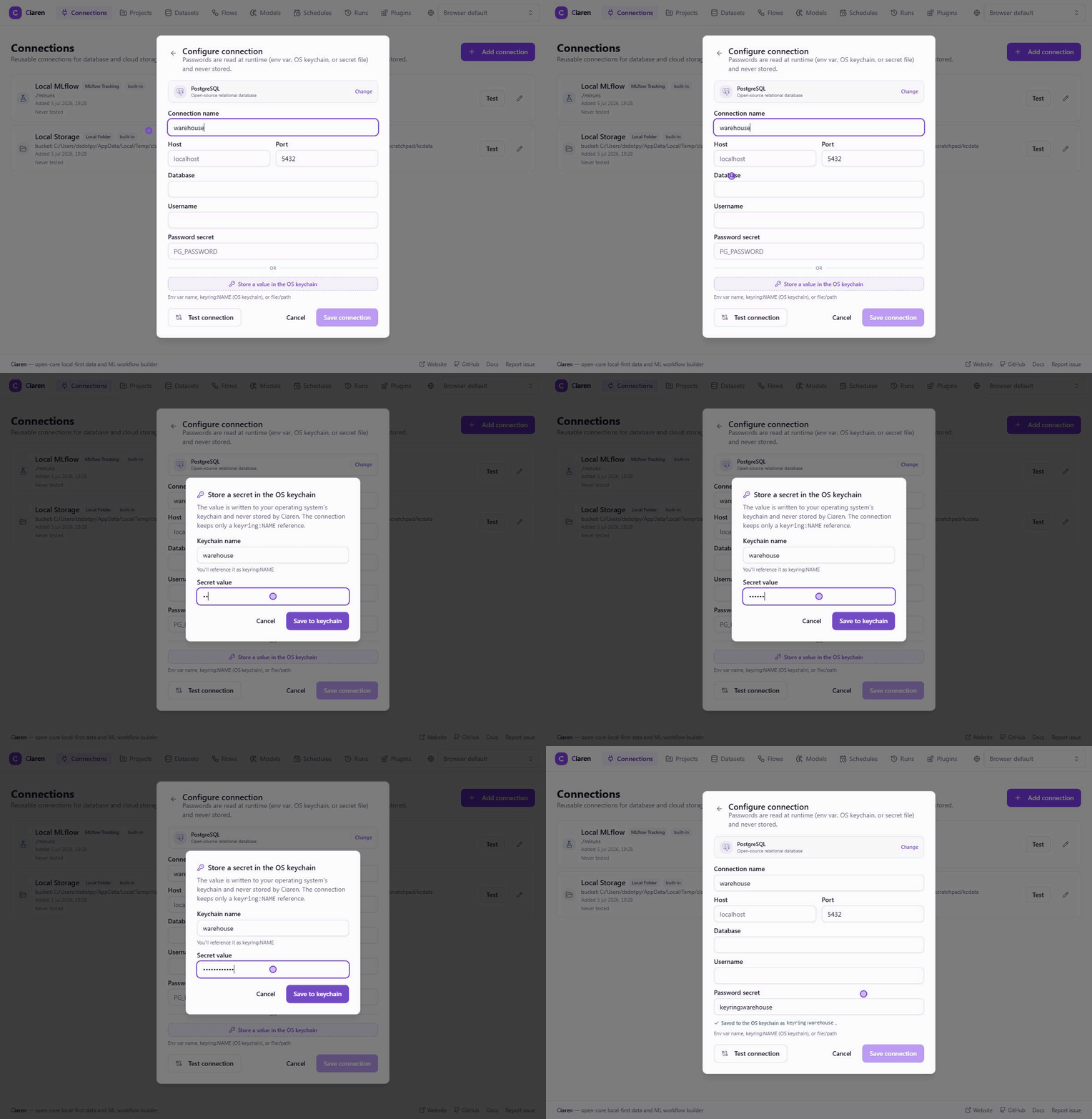
You don't have to drop to the CLI, though: the connection form has a
"Store a value in the OS keychain" button under the secret field. Enter a
name and the value, click save, and Ciaren writes the value to the OS keychain
and fills the field with the resulting keyring:NAME reference — the plaintext
is sent once, stored only in the keychain, and never persisted, echoed back, or
logged. When ciaren[keyring] isn't installed, or the host has no keychain
daemon (headless servers, containers), the button stays visible but disabled
and a hover explains what to install; env: or file: references apply there
instead.
file: references are confined to the allowed secrets folders —
<DATA_DIR>/secrets and /run/secrets by default, configurable with
CIAREN_SECRET_FILE_DIRS — so a connection can never point one at an arbitrary
server file. A trailing newline (as Docker secrets carry) is stripped. On a
hardened shared install, keep CIAREN_SECRET_FILE_DIRS and
CIAREN_STORAGE_ALLOWED_ROOTS pointing at disjoint locations, so no
storage connection can write into a folder secrets are read from.
Other safeguards: the SQLAlchemy URL is built from structured fields with
URL.create (no raw DSN to inject into) — both when Ciaren connects and in the
Python it exports, so a host, username, or database containing quotes or other
code-shaped characters stays an inert string argument rather than breaking out
of the generated script. Driver options can't override the connection's host/port
(so the SSRF guard can't be bypassed through options), table/schema
identifiers are validated, and any secret is scrubbed from driver error
messages — including its percent-encoded form, so a key containing + / = &
or spaces can't be read back out of a URL embedded in an error. REST API
connections refuse the well-known credential headers (Authorization,
Cookie, X-API-Key, …) as custom headers, and refuse credential-looking
query parameter names (api_key, token, client_secret, …) in both the
default query params and an endpoint's own query string — the secret must
come from the authentication settings and its env var, so it is never stored.
This check is best-effort: a credential under an unconventional header or
query-param name would still be stored in plain text, so keep secrets in the
authentication settings.
Two rules govern which env vars an env: (or bare) reference may name:
- Ciaren's own configuration variables (
CIAREN_API_TOKEN,CIAREN_WEBHOOK_SECRET, …) are always refused — otherwise a connection could send their values to a host of the author's choosing. - On shared deployments, set
CIAREN_SECRET_ENV_ALLOWLIST(exact names, or prefixes ending in*, e.g.["CIAREN_SECRET_*", "PG_PASSWORD"]) so connections can only use the variables you've designated as connection secrets. Empty (the default) allows any variable — fine for the local single-user posture, where the connection author owns the environment anyway.
Deleting a connection
Deleting a connection that flows still reference is refused with a message
listing those flows — repoint their SQL/Storage nodes first, or force the
delete (the UI asks; the API takes ?force=true), after which those flows
fail at run time until reconfigured.
Supported databases
Ciaren keeps built-in connectors selective so the open core stays lightweight. The list below covers common local, SQL, document, storage, and API workflows. For niche databases, SaaS products, internal APIs, or proprietary systems, use a connector plugin instead of adding the integration to core.
| Provider | Driver (optional) | Install |
|---|---|---|
| PostgreSQL | psycopg | pip install ciaren[postgres] |
| MySQL / MariaDB | pymysql | pip install ciaren[mysql] |
| SQLite | built-in | — |
| DuckDB | duckdb | pip install ciaren[duckdb] |
| SQL Server | pyodbc | pip install ciaren[mssql] |
| Snowflake | snowflake.sqlalchemy | pip install ciaren[snowflake] |
| MongoDB | pymongo | pip install ciaren[mongo] |
To pull in every database driver at once:
pip install ciaren[all]Drivers are optional. If one isn't installed, that provider appears disabled on the Connections page with an "install …" hint, so the core stays lightweight. SQLite needs no driver and is great for trying things out.
SQL Server needs a system-level ODBC driver too
pip install ciaren[mssql] (or EXTRAS=mssql in Docker) only
gets you pyodbc, the Python DB-API wrapper — it also needs the unixODBC
driver manager and an actual SQL Server ODBC driver (e.g. Microsoft's
msodbcsql18) installed at the OS level, or connections fail with "no default
driver specified." The official Docker image installs both automatically when
built with EXTRAS=mssql. Running Ciaren outside Docker, follow Microsoft's
install instructions
for your OS.
Creating a connection
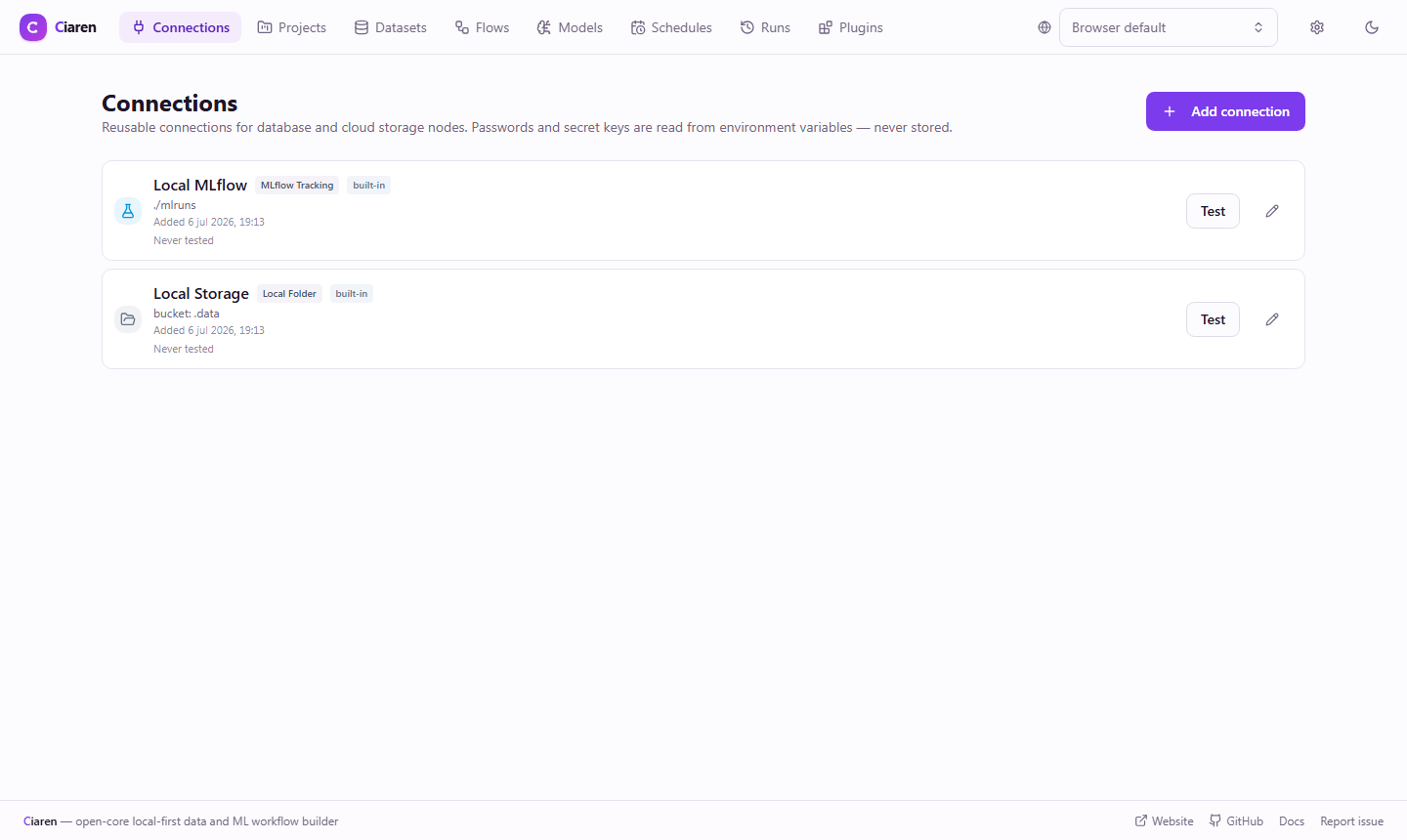
The Connections page ships with two pre-seeded built-in connections you'll see before adding any of your own:
- Local MLflow — the local MLflow tracking store (
./mlruns), used by the Machine Learning nodes to log experiments and register models. - Local Storage — a local file bucket (
bucket: .data) used by the Storage Input/Output nodes for quick, zero-setup file storage.
Both back core features out of the box and aren't meant to be deleted; treat them like defaults rather than connections you created.
-
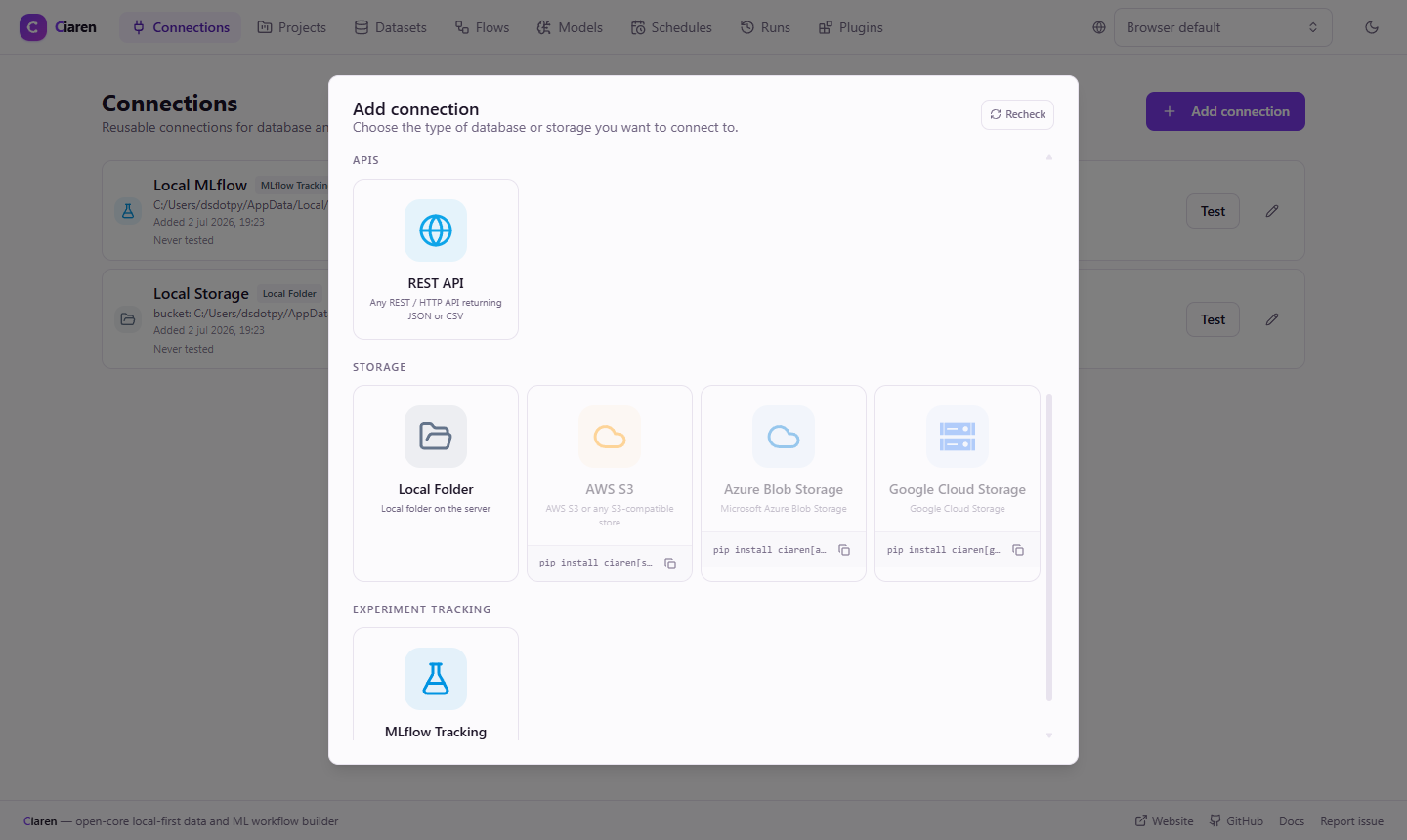
Go to Connections → Add connection. A provider picker appears:
-
Pick a provider. After selecting one (e.g. PostgreSQL) the connection form appears:
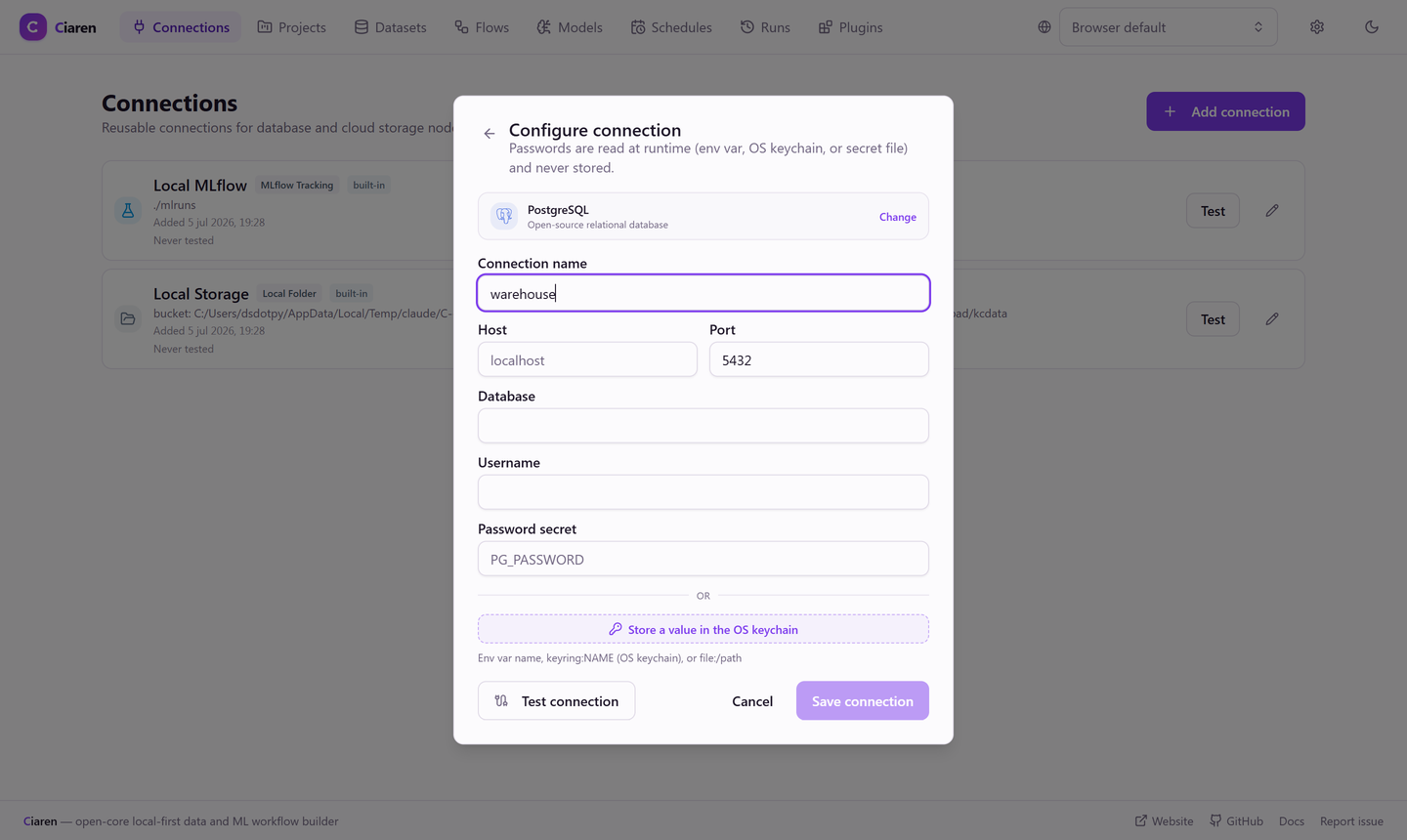
SQLite asks only for a file path; most others ask for host, port, database, username, and the password secret — a reference (env var name,
keyring:NAME, orfile:/path), or use Save a secret to the system keychain to store the value in the OS keychain in place. The actual secret is never stored by Ciaren.Snowflake is the exception: there's no port field (Snowflake's driver never uses one), and Account identifier replaces host. Warehouse, role, and schema are optional and shown as their own fields rather than buried in generic connection options.
-
Save, then click Test to verify connectivity.
Web APIs
The built-in REST API connector reads HTTP JSON/CSV endpoints like database tables — no driver required. It covers the connection options commercial tools offer:
| Option | What it does |
|---|---|
| Base URL | Every endpoint path is resolved against it. |
| Authentication | None, API key header (configurable header name), API key query parameter (configurable param name, default api_key), Bearer token, or HTTP Basic. The secret always comes from an env var — never stored, and (for the query-parameter style) always overrides any same-named duplicate left in the endpoint path or default query params. |
| Endpoints | Relative paths declared on the connection; each appears as a table in SQL Input. |
| Custom headers / default query params | Applied to every request (tenant headers, API versions, fixed filters). |
| Response format & records path | Auto/JSON/CSV, plus a dot path (e.g. data.items) for APIs that wrap their rows. |
| Pagination | Page-number pagination: page/page-size param names, page size, a start page (0 for APIs that count pages from zero instead of one), and a max-pages cap — the connector loops pages automatically. |
| Timeout & TLS verification | Per-connection request timeout and a TLS-verify toggle for internal endpoints. |
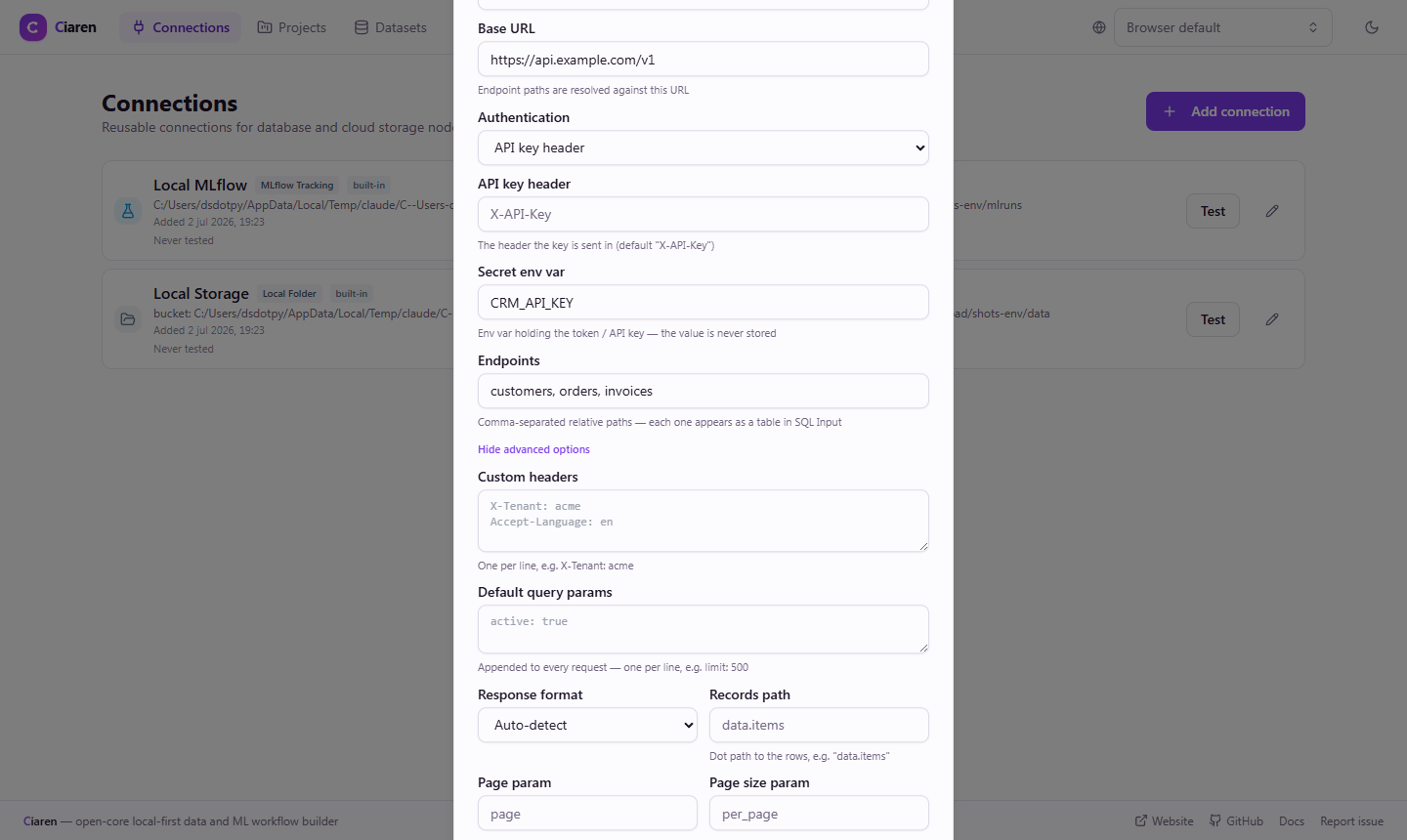
In a flow, use SQL Input: pick the API connection, then choose a declared
endpoint or switch to Custom request path (e.g. users?active=true).
Each run snapshots the response to parquet like any other input, so runs stay
reproducible. API connections are read-only — SQL Output doesn't list them.
The connector applies the same SSRF host guard as every other connector, and
responses are size-capped before parsing — 256 MiB per request and
cumulatively across the pages of one paginated read (with a hard ceiling of
1000 pages per read, whatever max_pages says). For larger extractions,
filter or window the endpoint and split the read across runs.
Connectors from plugins
Plugins can add connectors Ciaren doesn't ship in core — niche databases, SaaS-specific integrations, proprietary stores. Once a connector plugin is installed and approved (see Installing & Managing Plugins):
- its card appears in the Add-connection dialog under From plugins, with a Plugin badge;
- its form is driven by the connector's own metadata and schema — the plugin declares which fields it needs;
- Test, table/object listing, and the SQL / Storage nodes work exactly like a built-in provider. Secrets follow the same env-var-only rule.
See Connector Plugins to build one.
Requesting a new connector
For long-tail integrations, the preferred contribution is a plugin or an improvement to the Plugin SDK that makes the plugin possible. Core connector requests are accepted only when the integration is broadly useful and maintainable inside the lightweight open core.
Using SQL nodes in a flow
- SQL Input — choose the connection, then either pick a table (the list is read from the database) or switch to Custom SQL and write a query. The data is read live each run; scheduled flows therefore always get fresh data.
- SQL Output — choose the connection and a target table, and whether to
replace,append, orfailif it already exists.
Reproducibility
Each run snapshots its SQL inputs to parquet, so a run records exactly the data it processed even though the source is live.
Limitations
- MongoDB inputs use collection selection only (no custom SQL).
Next steps
- SQL input / SQL output — database I/O nodes
- Storage input / Storage output — S3/GCS/Azure Blob I/O nodes
- Scheduling — automate flows that pull fresh data